Showing posts with label Facebook iOS app. Show all posts

Sunday, October 16, 2022

Facebook app for iOS: Blocking accounts using in-app blocking option results in white screen of death

iOS 16.0.3

Facebook app for iOS (version 388.0)

Date: 10/16/2022

Description:

Here's a problem that I encountered today with the current version (388.0) of the Facebook app for iOS. If the user uses the block option that is presented when reporting an account for a violation of community standards, the app frequently (always?) ends up in an unresponsive state with a "white screen of death" being displayed to the user.

I got this problem to reproduce on an iPhone 8 running iOS 16.0.3 and an iPhone 6 running iOS 15. This problem is reproducing with the current version of the Facebook iOS app:


I managed to take a video of the problem, which I uploaded to Twitter:


Steps to Reproduce:

1. Launch the current version of the Facebook app for iOS (version 388.0)

2. Become perturbed by a Facebook account 

3. Report the account using the "Report profile" feature  

4. Report the account as a "Fake account"

5. From the "Does this go against our Community Standards?" prompt select "Submit"

6. From the "Thank you, we've received your report" prompt select "Next"

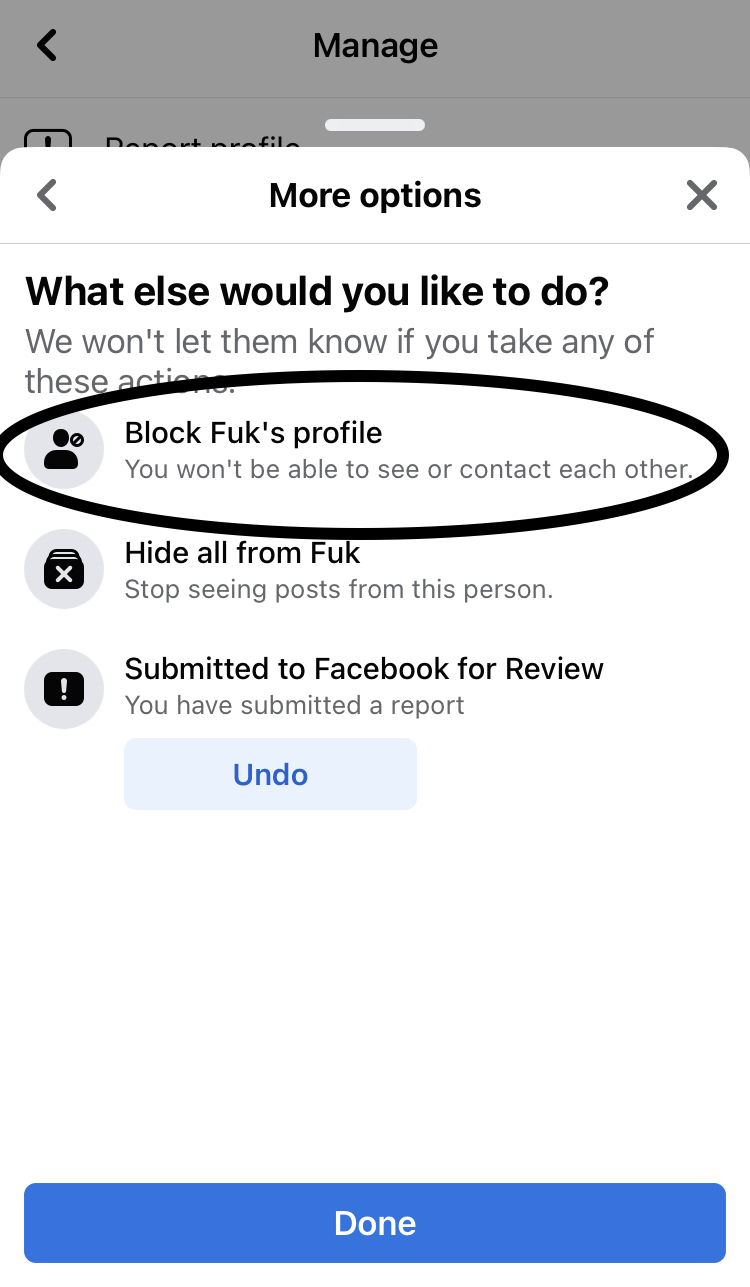
7. From the "What else would you like to do?" prompt select "Block ______'s profile" then select "Done"

8. From the "Block ________?" prompt select "Block"

Result: Blocking accounts using the in-app block feature results in the Facebook app becoming stuck in an unresponsive state 

Expected: Blocking accounts using the in-app blocking featured should NOT result in the Facebook app becoming unresponsive 


Here's a Facebook account with an offensive name that is engaged in behavior that likely violates community standards.

Report this account as a "fake account"

Report the account for violating community standards...

Select "Next"

Select the Block option from this option screen...


Select the "Block" option - app becomes unresponsive on a white screen of death.


Thursday, October 15, 2020

Facebook app for iOS: hashtag suggestions are not accessible from the Edit Caption option of any photo

 iOS 14.0.1

Facebook app for iOS (version 291.0)

Date: 10/15/2020


Description:

Here is a minor problem that I keep having with the Facebook app (version 291.0) for iOS. When the user edits the caption of any photo, suggested hashtags appear after entering in the "#" character.

None of the suggested hashtags appear to work. The user can't select them.

Here's a video of what I mean:


Steps to Reproduce:

1. Select any of your uploaded photos

2. Select the "Edit Caption" feature 

3. Enter in the "#" and any word to see the suggested hashtags

4. Select any suggested hashtag


Result: With the current version of the Facebook iOS app (version 291.0) the user can not select any of the suggested hashtags

Expected: The suggested hashtags offered by the Facebook iOS when editing a caption of a video should be accessible 


Select any photo that you have previously uploaded. Select the option in the upper right...


Select the "Edit Caption" option...


Enter in a "#" in the caption...


Try to select any of the suggested hashtags...


I can't select any of the suggested hashtags.


Monday, August 17, 2020

Facebook Gaming app for iOS: App crashes if you send a link using the FB Messenger opition

iOS 13.6
Facebook Gaming app for iOS (version 24)
Date: 08/17/20

Description:

I tried out the new Facebook Gaming app for iOS today. I keep getting a crash. This crash happens for me every time I send a link to a live stream using the in-app Facebook Messenger share option.

Here's the crash dump:


Steps to Reproduce:

1. Using an iPhone 8 running iOS 13.6, launch the app and sign in
2. Select a live stream
3. Select the share option from a live stream
4. Select the "Share to Group" Facebook Messenger option
5. Select any one person from the Facebook Messenger list
6. Send the invite

Result: The Facebook Gaming app for iOS crashes if the user sends a link to a live stream

Expected: The Facebook Gaming app for iOS should not crash if the user sends a link to a live stream

Launch the Facebook Gaming app for iOS (iPhone 8 running iOS 13.6)...

Select any live stream...

Select any live stream...

Select the Share option...

Send to any person... the app crashes.


Tuesday, November 12, 2019

Facebook app for iOS: This accessing the front camera bug everyone is talking about...

iOS 13.2.2
Facebook app (version 246.0) for iOS
Date: 11/12/2019

Description:

I've gotten it also! There is a wild bug with the current (246.0) Facebook app for iOS. Numerous bad reviews in the Apple App store are referencing this bug.

I believe this bug to be much worse than it appears - it probably explains why so many people are complaining about how the current iOS app is quickly draining battery power from iOS devices.

I've gotten this bug to reproduce two different ways. It is extremely easy to reproduce.

The easiest way:

Click on any photo in the app. Swipe up or down. If you look to the left, you can see that the camera is activated.

Looking through Twitter, you can see that has been referenced several times in recent hours and days. You can also find users contacting both Facebook and Apple Support on Twitter - with an unusual silence on the issue.

Here's a Twitter thread from a Twitter user named Joshua Maddux:


Here's another Twitter thread from a Twitter user named Daryl Lasafin:
One small blog has posted about this, but no one else seems to caught on. I would guess that this is draining the battery power of a great number of iOS users out in the wild. 

Steps to Reproduce:

1. Launch the Facebook app for iOS (version 24.6)
2. Click on photo in the app (Especially if it is a single uploaded photo)
3. Click again on the photo to expand it to full screen
4. Swipe either up or down

OR:

1. Launch the Facebook app for iOS (version 24.6)
2. Go to a profile page (Elizabeth Warrren's for example)
3. Click on her profile picture
4. From her expanded profile picture - swiftly swipe down from the middle of her face

Result: The current version of the Facebook app for iOS (version 24.6) actives the front facing camera of the iOS device if the user swipes down from a photograph

Expected: No iOS app should activate the front facing camera of the iOS device without express user consent - swiping down in an area of the UI should not activate the camera of the device

Here are some screenshots:

Head to any person's profile picture. Take Elizabeth Warren's, for example....

Swipe down, swiftly, from the middle of the profile picture...

The camera of the device is activated!!!