Showing posts with label unresponsive state. Show all posts

Wednesday, April 24, 2024

Coverstar - Positive Social app for iOS: Locking Phone WIth Amazon Cognito Dialog On Screen Turns App Unresponsive

 iOS 17.4.1

Coverstar - Positive Social app for iOS (version 8.0)

Date: 04/24/2024

Description:

Here's an odd bug, the likes of which I can't say I exactly seen before with an iOS app! There's an app called Coverstar - Positive Social. 

The app has an option to use Google credentials to create an account. If the user selects either the "Continue with Apple" or the "Continue with Google" options, a dialog about amazoncognito.com appears on screen. 

That dialog looks like this:


If the user locks the iPhone while this dialog is on screen, the app becomes, seemingly, permanently disabled until the app is reset. 


The user becomes stuck on this screen, with everything completely unresponsive. Exiting and relaunching the app doesn't work either...


Here's a video I captured of what this unresponsiveness looks like:


Steps to Reproduce:

1. Download and launch the Coverstar - Positive Social app for iOS

2. Select the "Profile" icon in the bottom right 

3. Select "Sign Up"

4. From the Sign up for Coverstar pop-up, select either "Continue with Apple" or "Continue with Google"

5. With the ""Coverstar" Wants to Use "amazoncognito.com" to Sign In" message on screen, press the side button on the iPhone 

6. Unlock the phone and return to the app

Result: Locking the phone while the ""Coverstar" Wants to Use "amazoncognito.com" to Sign In" message is displayed inside of the Coverstar app freezes the app - the app is unresponsive until there is a hard restart of the app

Expected: Locking the phone while the ""Coverstar" Wants to Use "amazoncognito.com" to Sign In" message is displayed inside of the Coverstar app should NOT freeze the app 

Sunday, October 16, 2022

Facebook app for iOS: Blocking accounts using in-app blocking option results in white screen of death

iOS 16.0.3

Facebook app for iOS (version 388.0)

Date: 10/16/2022

Description:

Here's a problem that I encountered today with the current version (388.0) of the Facebook app for iOS. If the user uses the block option that is presented when reporting an account for a violation of community standards, the app frequently (always?) ends up in an unresponsive state with a "white screen of death" being displayed to the user.

I got this problem to reproduce on an iPhone 8 running iOS 16.0.3 and an iPhone 6 running iOS 15. This problem is reproducing with the current version of the Facebook iOS app:


I managed to take a video of the problem, which I uploaded to Twitter:


Steps to Reproduce:

1. Launch the current version of the Facebook app for iOS (version 388.0)

2. Become perturbed by a Facebook account 

3. Report the account using the "Report profile" feature  

4. Report the account as a "Fake account"

5. From the "Does this go against our Community Standards?" prompt select "Submit"

6. From the "Thank you, we've received your report" prompt select "Next"

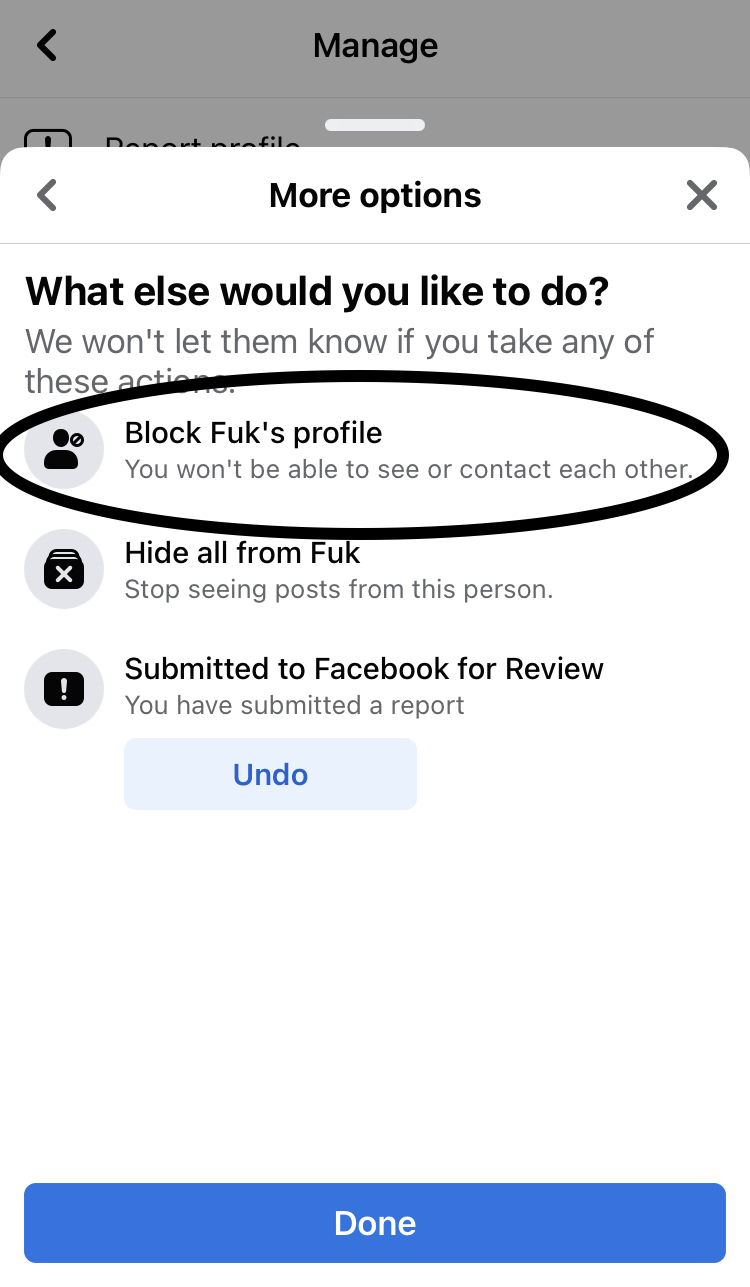
7. From the "What else would you like to do?" prompt select "Block ______'s profile" then select "Done"

8. From the "Block ________?" prompt select "Block"

Result: Blocking accounts using the in-app block feature results in the Facebook app becoming stuck in an unresponsive state 

Expected: Blocking accounts using the in-app blocking featured should NOT result in the Facebook app becoming unresponsive 


Here's a Facebook account with an offensive name that is engaged in behavior that likely violates community standards.

Report this account as a "fake account"

Report the account for violating community standards...

Select "Next"

Select the Block option from this option screen...


Select the "Block" option - app becomes unresponsive on a white screen of death.


Wednesday, September 11, 2019

Telegram App: Easy way to disable the app by selecting the forward facing camera option after camera access is disabled

Telegram app for iOS (version 5.11)
Date: 09/11/19

Description:

There is a minor bug with the current (version 5.11) Telegram app for iOS. This bug happens when the user has disabled/disallowed camera access.

The app will "freeze" - (be stuck in an unresponsive state) if the user opens up the camera, and hits the forward facing camera icon while camera access is disabled.

This is not a problem that a large number of users are likely to encounter. However, I always try variations of this with every app that I download. I was surprised to see that Telegram users will get stuck with an unresponsive app when they do this.

This is much easier to show than to describe, so please take a look at the attached screenshots.

Steps to Reproduce:

1. Download the Telegram app, create an account, disable camera access by the app
2. Launch the app
3. From the "Chats" screen, select the pen option in the upper right
4. From the "New Message" screen, select "New Channel"
5. From the "What is a Channel?" screen, select "Create Channel"
6. From the "Create Channel" screen, select "Set Channel Photo"
7. From the slider, choose the camera option
8. From black camera screen, select the front facing camera option

Result: With the camera access disabled, there is an easy to disable the app by pressing a forward facing camera button

Expected: The Telegram iOS app should never be disabled by selecting a forward facing camera option

Make sure that camera access is disabled...

Select the "New Channel" option...

Select the "Create Channel" option...

Select the "Set Channel Photo" option...

Select the camera option...

Press the forward facing camera option - the app is now frozen.