Showing posts with label Facebook login. Show all posts

Saturday, May 13, 2023

KOLLYY - Clothing & Fashion app for iOS: Facebook login leads to a missing Authorization page inside the Facebook iOS app

 iOS 16.4.1 (a)

KOLLYY - Clothing & Fashion app for iOS (version 3.0.9)

Date: 05/13/23

An app called KOLLYY for iOS has a non-working Facebook login. After selecting the Facebook option from inside the KOLLYY app, the user is taken to a not-found page


The same problem reproduces on web:


Steps to Reproduce:

1. (with the FB iOS app on the phone) Download and launch the KOLLYY app for iOS

2. Select "Me"

3. Select "Sign In/Register >"

4. Select the Facebook option 

5. From the "KOLLYY Wants to Use Facebook" pop-up select "Continue"

6. From the "Open in Facebook" pop-up select "open"

7. Note the "It looks like this app isn't available" error message

Result: The Facebook login path from inside he KOLLYY app to Facebook is broken. Select the Facebook login option from inside the KOLLYY app takes the user to a non-working page 

Expected: Facebook login and account creation with the KOLLYY app should work correctly 


KOLLYY app for iOS

Launch the KOLLYY app...


Choose the Facebook login option...


Select the "Continue" option from the pop-up...

KOLLYY app

Select "Open"...


Facebook login isn't working. Problem on KOLLYY's end. 


Friday, February 10, 2023

Vylo app for iOS: Facebook login screen has non-working Privacy and TOS links

 iOS 16.3

Date: 02/10/2023

Vylo app for iOS (version 1.1.20)

Description:

The Vylo app for iOS has an option to use Facebook credentials to create an account. One minor problem: the login confirmation page displayed inside of the Facebook app has non-working Privacy Policy and Terms of Service links. 

Selecting either the Privacy Policy or Terms of Service links will land the user on a page that says, "The page you requested was not found."

Take a look:


Steps to Reproduce:

1. Download the Vylo app for iOS (version 1.1.20)

2. From the "Join the conversation." page, select "Continue with Facebook"

3. From the in-app prompt, select "Continue"

4. From the "Open in Facebook" prompt, select "Open"

5. From the requesting access page, select either "Privacy Policy" or "Terms of Service"


Result: The "Privacy Policy" and "Terms of Service" links on the Facebook login confirmation page are not working/don't take the user to valid documentation 


Expected: Links such as "Privacy Policy" and "Terms of Service" should always work 

Select the "Continue with Facebook" option...

Select the "Continue" option from this prompt...

Select the "Open" option from this prompt...

Select either the "Privacy Policy" or "Terms of Service" links...

No Privacy Policy or Terms of Service 


Saturday, February 12, 2022

Mr & Mrs Smith Boutique Hotels app for iOS: Canceling out of Facebook login results in bad error messaging

 iOS 15.3 on an iPhone 8

Mr & Mrs Smith Boutique Hotels app for iOS (version 4.0.6)

Date: 03/07/2022


Description:


Here's a bug I haven't seen in a long while! With the Mr & Mrs Smith Boutique Hotels app for iOS, there is an option to use your Facebook login to create an account. If you cancel out of this prompt, this is the error message that is displayed:


An error message of "The operation couldn't be completed. (User cancelled login. error 400.)" appears.


Steps to Reproduce:

1. Download and launch the Mr & Mrs Smith Boutique Hotels app for iOS

2. Select "JOIN FOR FREE"

3. Select the blue Facebook option 

4. From the "SmithHotels" wants to Use" prompt, select "Cancel"

Result: Canceling out of the Facebook login prompt during account creation results in a less than informative error message

Expected: Error messages this bad shouldn't be displayed with iOS 


Select the "JOIN FOR FREE" option...

Select the Facebook option...

Select "Cancel"...


Tuesday, July 27, 2021

Facebook app for iOS: Canceling out of prompt after leaving the Previously Logged In screen strands user - certain apps!

 iOS 14.7

Facebook app for iOS (version 328.0)

Date: 07/27/21


Description:

There's a strange problem that I have started noticing with Facebook's login authorization process when accessed via a Facebook login for account creation in an iOS app.

This does NOT happen with all apps. I just spotted this with Flipboard and Etsy - and I assume that it happens with some other apps.

This leaves the user stranded inside the Facebook iOS app - and is really bad end-user experience. 

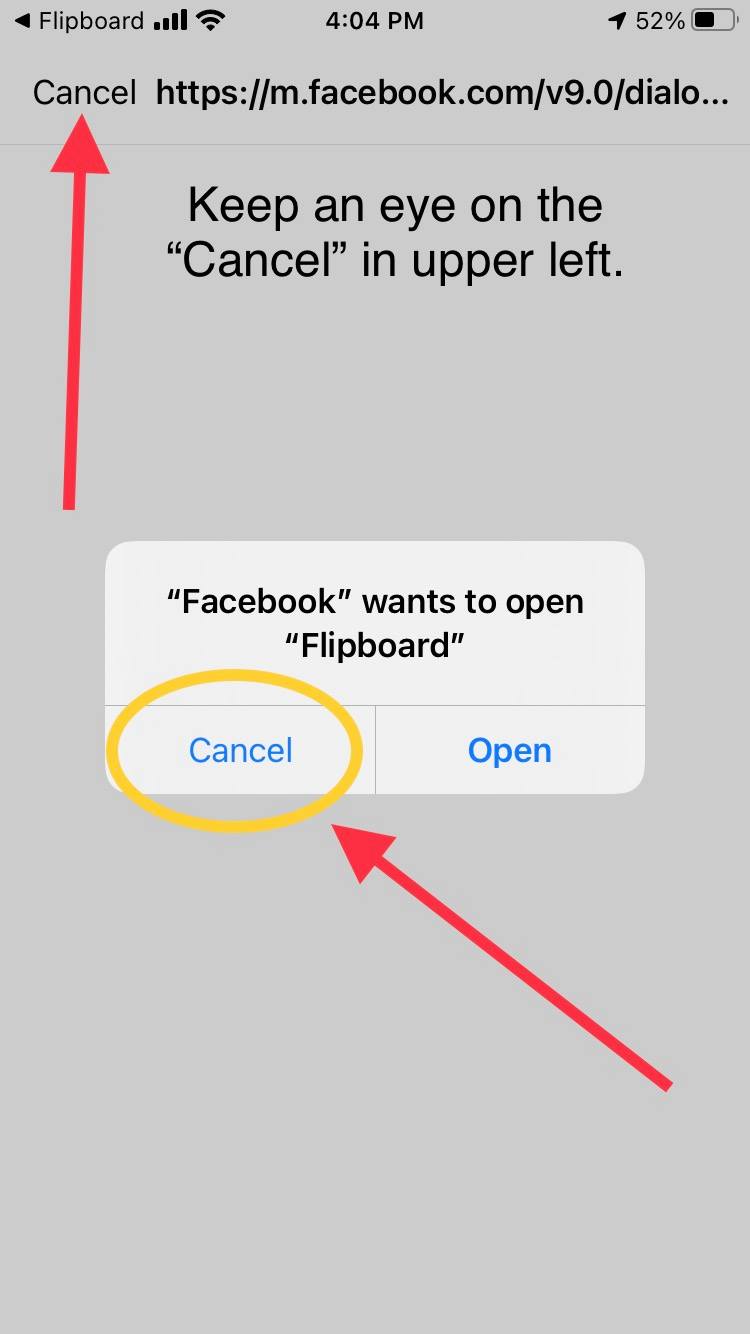
Take a look at Flipboard's "You previously logged in to Flipboard with Facebook" authorization screen. If the user cancels out of this page:


And then selects the "Cancel" option from this prompt:


The "Cancel" option in the upper left will disappear. This leaves the user...


Completely and totally stranded here. There doesn't appear to be any way to "Cancel" out of anything, and the user is forced to restart the Facebook app. This is a new problem, that I spotted with apps such as Flipboard and Etsy. I don't ever recall seeing this happen before.

Steps to Reproduce:

1. Have a Facebook account that has previously logged into Flipboard 
2. Download and launch the Flipboard app (version 4.2.111)
3.  Pick the three topics to follow and advance to the account login screen
4. Choose the "Continue with Facebook" prompt
5. From the "Flipboard wants to use Facebook" prompt select "Continue"
6. From the "Open in Facebook" prompt select "Open"
7. From the "You previously logged in" page select "Cancel"
8. From the "Facebook wants to open Flipboard" prompt select "Cancel"
9. Watch the "Cancel" in the upper left disappear 

Result: The user gets trapped on a page after canceling out of a Facebook authorization prompt - user is stuck with the Facebook app being unresponsive, cannot exit from a white screen

Expected: User should not be trapped 

Like I said: this seems to be happening with some apps - not all. 


They will now sometimes be stranded!

Thursday, September 17, 2020

Weee! - Asian Grocery app for iOS: Select "Cancel" from a Facebook prompt still activates FB log-in page

 iOS 14

Weee! - Asian Grocery app for iOS (version 10.6.1)

Date: 09/17/20


Description:


Here's another minor problem with the Weee! - Asian Grocery app for iOS. This is easier to show than to describe, so please take a look at this video:


The app has an option to send out invites. If the user selects the Facebook option, there is this prompt:


 This prompt is a bit problematic, because selecting the "Cancel" option still activates a Facebook log-in page. Selecting "Cancel" should not be doing this!

Steps to Reproduce:

1. Download and launch the Weee! app

2. Create an account

3. Select the "Invite a Friend to Join" option 

4. Select the "Send Invite Now" button

5. Select the Facebook option from the share menu

6. Select "Cancel" from the "Weee!" wants to open Facebook' prompt


Result: Selecting "Cancel" on an open Facebook prompt inside of the Weee! app isn't working - still activates a Facebook log-in

Expected: Selecting "Cancel" should work and cancel a process 


After creating an account - select the "Invite a friend to join" option...


Select the "Send invite now!" button...


Select the "Facebook" option...

Select the "Cancel" option...

This Facebook login page is still activated - even though the user selected the "Cancel" option!


Saturday, August 1, 2020

Facebook Login: New links lead to pages that have a non-working share option

iOS 13.6
Facebook Auth Login pages - Privacy Policy/TOS pages
Date: 08/01/20

Description:

Here's an odd thing that either just started, or I just started noticing. Facebook Authorization Login pages now seem have added links to the bottom.

Take a look at this screenshot:

This is the Log in for Pinterest. As you can see, two links have been added.

A great addition! Twitter authorization always had this.

There's an odd but that appears to happen after being taken to the pages linked to by this link. There's a share option which doesn't work.

Take a look at this screenshot:

Users are taken from the Facebook log in to pages like this. You'll notice the share option in the upper right...

The "Share Link" option does nothing. It should bring up the iOS share sheet, but it does not.

Steps to reproduce:

1. Using an app running iOS 13.6, launch an app that has a Facebook option for account creation 
2. Head to Facebook authorization 
3. Click on the next links at the bottom of the authorization page
4. Click on the "share" option in the upper right 
5. Click on "Share Link" option in the pop-up menu 

Result: There is a "Share Link" option accessible from the new links on the Facebook Messenger log in page - selecting "Share Link" does nothing, it should bring up the iOS share sheet

Expected: A "Share Link" option should work - should activate the iOS share sheet 

Thursday, May 7, 2020

Product Hunt app for iOS: Facebook Login doesn't work

iOS 13.4.1
Product Hunt app for iOS (version 4.3.4)
Date: 05/07/20

Description:

I am having the exact same problem with the Product Hunt app for iOS that this reviewer has:

The Facebook login doesn't work for me. This happened a week ago, and again today. I've deleted and re-downloaded.

Here's a video of what I am seeing:


It's the same problem this Twitter user has:


Steps to Reproduce:

1. Download the Product Hunt app for iOS
2. Select the profile option in upper left
3. Click on the Facebook option

Result: The Facebook login option doesn't work for me - just an infinite spinning

Expected: The Facebook login option in the Product Hunt app for iOS should work 

Tuesday, December 3, 2019

Vogue Runway Fashion Shows app for iOS: Facebook sharing/login not working

iOS 13.2.3 on an iPhone 8
Vogue Runway Fashion Shows app for iOS (version 7.6.2)
Date: 12/04/2019

Description:

Facebook integration does not seem to work with the Vogue Runway Fashion Shows app (version 7.6.2) for iOS.

If a user tries to share a show using the Facebook Messenger sharing option, an error message appears saying that the content couldn't load.

If the user tries to login using the "Continue with Facebook" button on the "Start Bookmarking Today!" screen, a cancel error message appears as soon as the button is pressed.

I am not the first user to notice this. Here is a review in the app store:

Steps to Reproduce:

1. Download and launch the Vogue Runway Fashion Shows app for iOS
2. Select "MY SHOWS"
3. On the "Start Bookmarking Today!" screen, click on the "Continue with Facebook" button

Result: An error message appears when the user presses the "Continue with Facebook" button on the "Start Bookmarking Today!" screen

Expected: No error message should appear when the user presses the "Continue with Facebook" button on the "Start Bookmarking Today!" screen

Press the "Continue with Facebook" button...

This message appears.


OR:

1. Download and launch the Vogue Runway Fashion Shows app for iOS
2. Select any collection
3. Try to share the collection using the Facebook Messenger option built into the share UI of iOS

Result: A "couldn't load content" error message appears if the user tries to share a collection from the Vogue Runway Fashion Shows app

Expected: User should be able to share collections via Facebook Messenger from inside of the Vogue Runway Fashion Shows app

Head to any collection and select the share option...

Select the Messenger option...

This error message appears. Please fix!


Friday, November 15, 2019

Quartermaster app for iOS: Facebook login crashes the app

iOS 13.2.2
Quartermaster app for iOS (version 1.56)
Date: 11/15/2019

Description:

There is a crash with the current (version 1.56) Quartermaster app for iOS.

Launch the app and select the "Continue with Facebook" option. The app will crash.

Here's the crash dump:


Steps to Reproduce:

1. Download and launch the Quartermaster app for iOS
2. Select the "Continue with Facebook" option

Result: The Quartermaster app for iOS crashes after the "Continue with Facebook" option is selected

Expected: The Quartermaster app for iOS should not crash after the "Continue with Facebook" option is selected

Launch the app...

Select the "Continue with Facebook" option.