Showing posts with label dead link. Show all posts

Thursday, September 10, 2026

Woot app for iOS: The "terms of use" link in the app is dead

 iOS 26.6.1

Woot app for iOS (version 6.2.0)

09/10/2026

Description:

There is a dead link inside of the Woot app for iOS (version 6.2.0). The "terms of use" app that appears on the Woot Sign-in page is dead. It presumably should lead to a readable terms of use page. Specifically, this terms of use page: https://archive.is/ZRpVi

Note this problem also occurs with the Woot Android app. 

This is the "terms of use" link that works on a Chromebook:

https://www.woot.com/terms?ref=w_ft_wiw_tc

https://archive.is/ZRpVi


Steps to Reproduce:

1. Download and launch the Woot app for iOS (version 6.2.0)

2. Select the "Account" option at the bottom right of the screen 

3. Select the "Log in to Woot" option 

4. Press the "terms of use" link on the Woot sign-in page 


Result: The "terms of use" link does not work inside of the Woot app for iOS. Users are unable from reading the terms of use before creating at account 

Expected: The "terms of use" link inside of the iOS app should work - users should be able to read the terms of use 

Please see the screenshots below:

Download and launch the Woot app for iOS (version 6.2.0)


Select the "Account" option...

Select the "Log in to Woot" option...

Select/Press the "terms of use" link. The link is dead.


Saturday, June 14, 2025

Woot app for iOS: "Conditions of Use" and "Privacy Notice" links on an Amazon Sign-In screen lead to an error page

 iOS 18.5

Woot app for iOS (version 5.6.0)

06/15/2025

Description:

Two links to Amazon's "Conditions of Use" and "Privacy Notice" do not work inside of the Woot app for iOS. 

These links take the user to a page that looks like this:

With this URL:

https://na.account.amazon.com/ap/lwa-consent-apa-conditions-of-use-url

Please take a look at the screenshots below for additional information. 

Steps to Reproduce:

1. Launch the Woot app for iOS (version 5.6.0)

2. Select "Account"

3. From the "Account" screen select "Log in to Woot"

4. From the Woot Sign-in screen, select "Create your Amazon account"

5. From the Amazon Sign-In screen, select either "Conditions of Use" or "Privacy Notice"

Result: the "Conditions of Use" and "Privacy Notice" links accessible from inside of the Woot app on an Amazon Sign-in screen do NOT take the user to valid conditions of use or privacy notices 

Expected: all "Conditions of Use" and "Privacy Notice" links accessible from inside of the Woot app should always be working links that lead to valid conditions of us and privacy notices 

Launch the Woot app...

Enter into the app...

Select the "Account" option...

Select the "Log in to Woot" option...

Select the "Create your Amazon account" option...

Select either the "Conditions of Use" or "Privacy Notice" links...

User lands here. 


Wednesday, November 27, 2024

AWS Events app for iOS: Cookie Preferences link is dead

 iOS 18.1.1

AWS Events app for iOS (version 7.6.0)

11/27/2024

Description:

Here's an unusual problem: the AWS Events app has a "Cookie preferences" link. Nothing happens when this link is selected. The other links on this page ("Privacy Policy" and a "Site terms" links) take the user to expected pages. 

The "Cookie preferences" link does nothing. 

Here's what it looks like inside of the iOS app:


Here's what it looks like when that login page (https://registration.awsevents.com/flow/awsevents/reinvent24/reg/login) is accessed on a laptop:


The "Customize cookie preferences" page appears, along with a link to the AWS Cookie notice. 


Other Amazon produced apps have cookie preference pages that are accessible via in-app options. Presumably the AWS Events app should have this option for GDPR compliance? 

Steps to Reproduce: 

1. Download and launch the AWS Events app for iOS (version 7.6.0)

2. From the "All events" page, select "AWS re:Invent 2024"

3. From the "Sign In" page, scroll down and select "Cookie Preferences"

Result: The "Cookie preferences" link on the AWS Events login page inside of the AWS Events app is inactive - no cookies pop-up is activated 

Expected: There should not be a dead link inside of an Amazon released iOS app 

Please Note: The same problem occurs with AWS Events app for Android (version 7.6.0)


Download and launch the AWS Events app for iOS...


Select the "AWS re:Invent 2024" option...


Scroll down to the bottom of this login screen...


Select the "Cookie preferences" option: Nothing happens! 


Tuesday, November 12, 2024

People's Daily app for iOS: Privacy Policy links in App Store listing does not lead to a privacy policy

 iOS 18.0.1

People's Daily app for iOS (version 4.2.6)

11/12/2024

Description: 

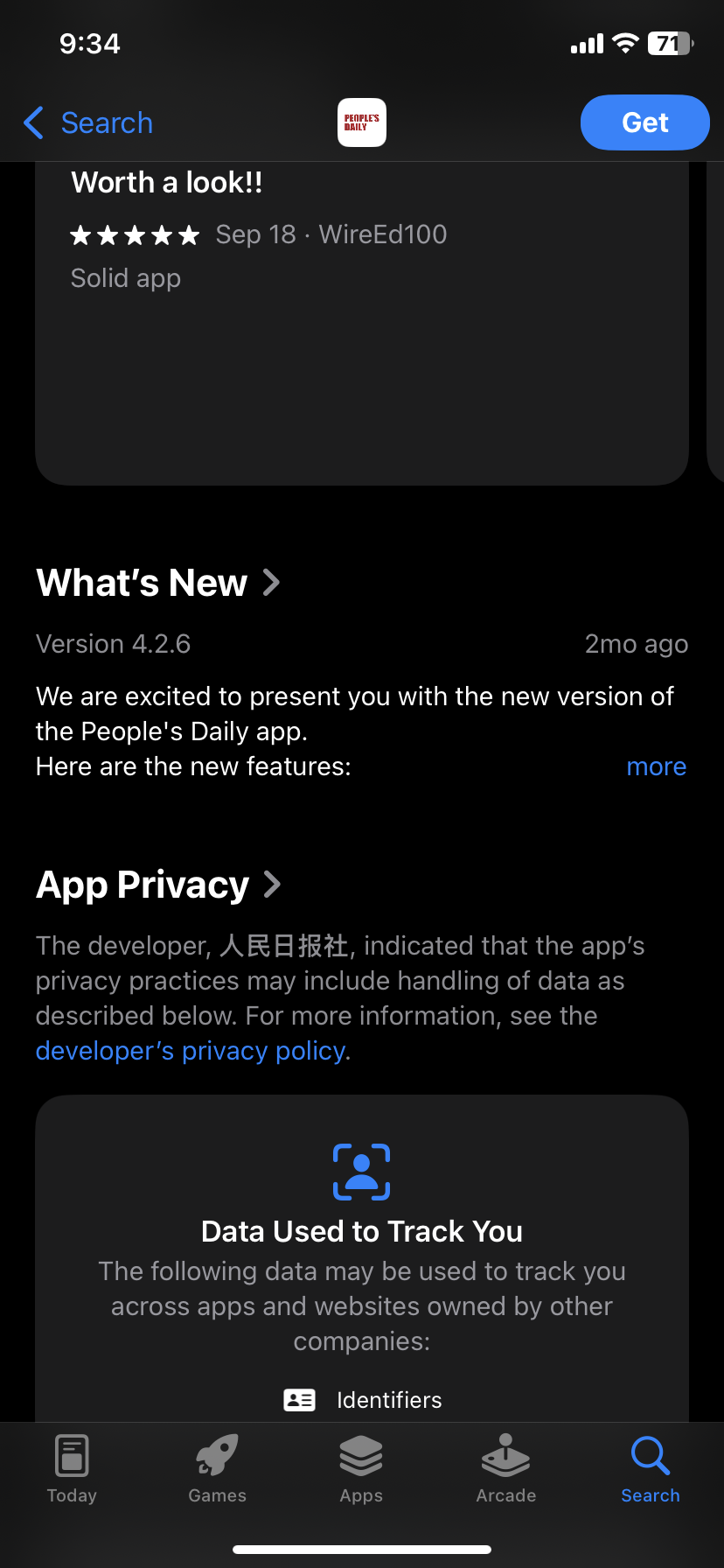
According to Apple App store rules, "all apps must include a link to their privacy policy in the App Store Connect metadata field and within the app in an accessible manner." 


The People's Daily app for iOS does not follow this rule. The People's Daily app for iOS Apple App store listing links to a bad URL.


Steps to Reproduce:

1. Head to the People's Daily app for iOS listing in the Apple App Store 
2. Scroll down and select either "developer's privacy policy" or "privacy policy"

Result: The "developer's privacy policy" or "privacy policy" links on the People's Daily app store listing do NOT lead to a readable privacy policy 

Expected: The "developer's privacy policy" and "privacy policy" links from the People's Daily app store listing should lead to a readable privacy policy 


Select the "developers privacy policy" link...


Leads to: https://api.en.pdnews.cn/html/privacyPolicy.html which is not a working privacy policy. 


Sunday, October 13, 2024

Pluckers app for iOS: Privacy Policy link in App Store listing lead to a 404 Page

 iOS 18.1

Pluckers Club app for iOS (version 2.1.62)

Date: 10/09/2024

Description:

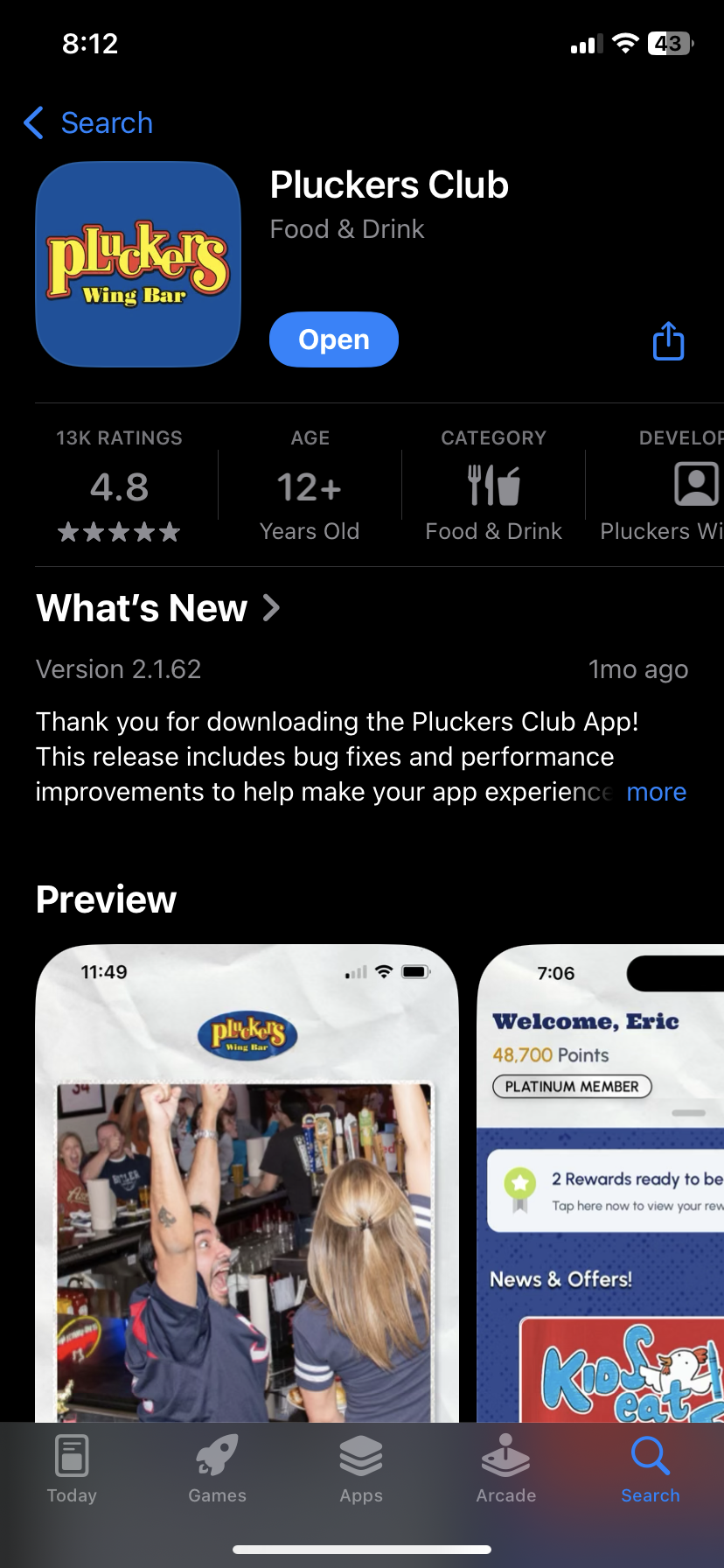
An app called Pluckers Club for iOS has a bad Privacy Policy link in the Apple App Store listing for the app.


The Privacy Policy link leads to a page that looks like this:


This is the URL in question: https://www.pluckersclub.com/MemberNew/TermsAndConditions/Terms.aspx

Steps to Reproduce:

1. Head to the Apple App Store listing for the Pluckers app for iOS

2. Click on the "Privacy Policy" link 

Result: The "Privacy Policy" link on the Pluckers app for iOS detail page in the Apple App Store does not work - it leads the user to a URL that displays a "Server Error in '/' Application" error message 

Expected: The "Privacy Policy" link for the Pluckers app for iOS displayed on the detail page in the Apple App Store should always work and take the user to a valid privacy policy 


Pluckers app in the Apple App Store. 


Below you'll see the error message displayed by: https://www.pluckersclub.com/MemberNew/TermsAndConditions/Terms.aspx


Tuesday, September 3, 2024

Laurie Buckhout For Congress app for iOS: Privacy Policy Link In App Store Working Does Not Lead to a Privacy Policy

 iOS 17.6.1

Laurie Buckhout for Congress app for iOS (production version)

Date: 09/03/2024

Description:

Today I took a look at an app called Laurie Buckhout for Congress that is available to download from the Apple App Store. This app does not have a valid (working) link to a Privacy Policy in either the app store listing, or from inside of the app.

According to Apple App Store rules, "all apps must include a link to their privacy policy in the App Store Connect metadata field and within the app in an accessible manner. 

The Apple App Store rules regarding access to privacy policies are very clear. 


Here's what the app store listing looks like:

This is the Apple App Store listing for Laurie Buckhout for Congress. Scroll down to the Privacy Policy link...

Click on the "developer's privacy policy" link...

This is obviously not a valid privacy policy.


Steps to Reproduce:

1. Head to the Laurie Buckhout for Congress app for iOS Apple App Store page
2. Scroll down to the "developer's privacy policy" and "privacy policy" links

Result: The "developer's privacy policy" and "privacy policy" links on the Laurie Buckhout for Congress Apple App Store listing page do not lead to valid privacy policies 

Expected: There needs to be working privacy policy links in the Laurie Buckhout for Congress Apple App Store listing 


Monday, April 29, 2024

Australian Ugg Original Au app for iOS: App Store Link Does Not Work

 iOS: 17.4.1

Australian UGG Original AU app for iOS (version 1.4)

Date: 04/29/2024

Description:

Hello, there's a problem with the link to the Australian Ugg Original AU app that is accessible via the "Share this app" option inside of the app.

The link looks like this: itms-apps://itunes.apple.com/app/id1592695994

And it isn't active. There are articles about this being a common problem on the internet. 


Steps to Reproduce:

1. Download the Australian UGG Original AU app for iOS (version 1.4)

2. Launch the app - select the side bar in the upper right 

3. Scroll down and select "Share this app"

4. Select any option email/Messenger

Result: the auto-generated app store link does not work 

Expected: the auto-generated app store link should always be active and take the user to the app in the app store 


Select the "Share the app" option...


Monday, April 22, 2024

Chico's Women's Clothing app for iOS: Terms of Use and Privacy Policy links not working

 iOS: 17.4.1

Chico's - Women's Clothing app for iOS (version 3.0.0)

Date: 04/22/2024

Description:

There's a problem with the "Terms of Use" and "Privacy Policy" links inside of the iOS app when the user is registering a new account. Neither of these links seem to work. Clicking them does not take the user to a "Terms of Use" or a "Privacy Policy". Oddly, if the user does press these links, during account creation, they seem to activate after the user enters the app. 


You can see the "Terms of Service" and "Privacy Policy" links in this screenshot:


Selecting either of these links does not activate them.


Steps to Reproduce:

1. Download the Chico's - Women's Clothing app for iOS

2. From the "Welcome!" screen, select "Register"

3. From the "By creating an account, you agree to the Terms of Use, Privacy Policy, and rewards program Terms & Conditions." select either "Terms or Use" or Privacy Policy"

Result: the "Terms of Use" and "Privacy Policy" links on the Register screen are not active 

Expected: that the "Terms of Use" and "Privacy Policy" links on the Register page work and are active 


Download and launch the Chico's - Women's Clothing app for the app store...


Launch the app...


Select the "Register" option...


Select either the "Terms of Use" or "Privacy Policy" links...


The "Terms of Use" and "Privacy Policy" links to NOT lead to this information...


Thursday, April 6, 2023

Lemon8 app for iOS: Auto-Generate Tweets from sharing City Specific Lemon8 Posts Have Dead Links

 iOS 16.3.1

Lemon8 app for iOS (version 3.9.1)

Date: 04/06/2023

Description:

Minor problem with the Lemon8 app and the auto-generate tweet that is created when sharing a Lemon8 posts tagged from a particular city.

There's a lack of a space between the #Lemon8 and the URL in the auto-generated tweet. This results in the URL in the tweet being inactive. 

This is easier to show than to describe, so take a look:

The Lemon8 app allows you to browse posts by city. Here's Denver. The arrow in the upper right lets a user share this...


Select the Twitter option from the iOS share sheet...


The URL in the Tweet is inactive (dead)

Steps to Reproduce:

1. Download and Launch the Lemon8 app 
2. In the input box, search for a city (example: "Denver")
3. Click on a Location-tagged Lemon8 post
4. Select the city tag
5. Share the city tag to Twitter (using iOS share sheet)

Result: The URL in auto-generated tweets about cities is inactive

Expected: The URL in auto-generated tweets about cities should not inactive 


Monday, February 27, 2023

Pinterest app for iOS: Bad Terms Link on the FB Authorization page

 iOS 16.3.1

Pinterest app for iOS (version 11.6)

Date: 02/27/2023

Description:

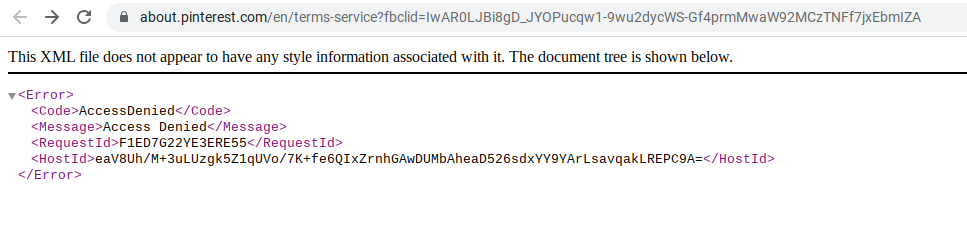
There's a bad "Terms" link on the Pinterest Facebook authorization screen. It leads to:

https://about.pinterest.com/en/terms-service?fbclid=IwAR0LJBi8gD_JYOPucqw1-9wu2dycWS-Gf4prmMwaW92MCzTNFf7jxEbmIZA


The same problem reproduces on a laptop. Here's a screenshot of what it looks like:


Steps to Reproduce:

1. Download the Pinterest app for iOS
2. Select "Log in"
3. Select the "Continue with Facebook" option 
4. From the "Pinterest" Wants to Use" option select "Continue"
5. From the Open in Facebook option, select "Open"
6. From the Log in With Facebook option, select "Terms"

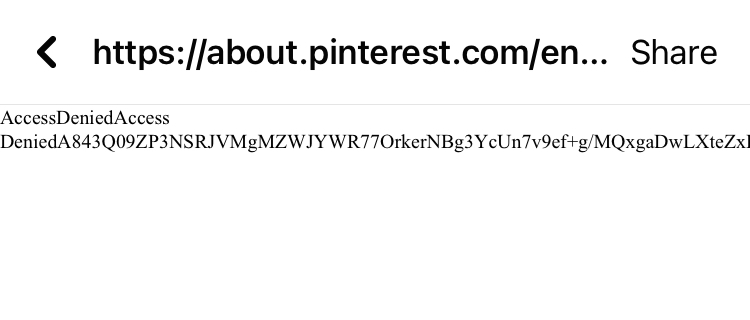
Result: The "Terms" link on the Facebook login for Pinterest leads to an Access Denied page 

Expected: The "Terms" link on the Facebook login for Pinterest should never lead to an Access Denied Page

This is the "Terms" link on the Facebook in-app authorization for Pinterest. It leads to: https://about.pinterest.com/en/terms-service

The error message. 


Friday, February 10, 2023

Vylo app for iOS: Facebook login screen has non-working Privacy and TOS links

 iOS 16.3

Date: 02/10/2023

Vylo app for iOS (version 1.1.20)

Description:

The Vylo app for iOS has an option to use Facebook credentials to create an account. One minor problem: the login confirmation page displayed inside of the Facebook app has non-working Privacy Policy and Terms of Service links. 

Selecting either the Privacy Policy or Terms of Service links will land the user on a page that says, "The page you requested was not found."

Take a look:


Steps to Reproduce:

1. Download the Vylo app for iOS (version 1.1.20)

2. From the "Join the conversation." page, select "Continue with Facebook"

3. From the in-app prompt, select "Continue"

4. From the "Open in Facebook" prompt, select "Open"

5. From the requesting access page, select either "Privacy Policy" or "Terms of Service"


Result: The "Privacy Policy" and "Terms of Service" links on the Facebook login confirmation page are not working/don't take the user to valid documentation 


Expected: Links such as "Privacy Policy" and "Terms of Service" should always work 

Select the "Continue with Facebook" option...

Select the "Continue" option from this prompt...

Select the "Open" option from this prompt...

Select either the "Privacy Policy" or "Terms of Service" links...

No Privacy Policy or Terms of Service