Tuesday, December 14, 2021

Dolly app for iOS: Privacy Policy page has illegible characters instead of quotation marks

 iOS 15.1

Dolly app for iOS (version 3.131.2)

Date: 12/14/21

Description:

There are illegible characters instead of quotations marks in the Dolly privacy policy, when it is viewed from inside the iOS app. This does not happen with the Android app, it is specific to the iOS app.


Take a look at how quotation marks look in the privacy policy:


Compare that with the same privacy policy when it is view using the Android app:


Easy to read. The quotation marks are clearly quotation marks. 


Steps to Reproduce:

1. Download and launch the Dolly app for iOS

2. Select "Get Started"

3. Select "Help"

4. Select "Privacy Policy"

5. Note that all quotation marks are illegible characters 

Result: The privacy policy page inside of the Dolly iOS app has illegible characters instead of quotation marks - makes the policy difficult to read

Expected: There should never be illegible characters instead of quotation marks on Dolly's Privacy Policy page 


Select the "Help" option...


Select the "Privacy Policy" option...

Quotation marks turn into gibberish. 


Crocs app for iOS: Duplicated URLs of Croc products when shared via email from inside the iOS

iOS 15.1

 Crocs app for iOS (version 1.0.79)

Date: 12/14/21

Description:

There's a minor problem with social sharing and the Crocs app for iOS.

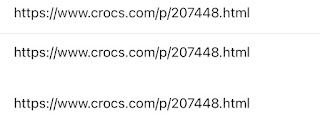
When you share a product from inside of the app, using an email share feature from the iOS share sheet, the default email message duplicates the URL:


One URL in the Subject Line of the email, and two URLs in the default body of the email message.


And the default subject line is also just a URL. This doesn't happen very often with any iOS apps.


Steps to Reproduce:

1. Download the Crocs app

2. Select any item inside the app

3. Select the share option "arrow" to activate the iOS share sheet

4. Select an email option (like Gmail)

5. Note two URLs in the default email message (and a URL in the subject line)


Expected: There should be only one URL in the default message 


Select the share option from any product displayed inside of the app...


Select the Gmail option....


Two URLs in the body of the email message - one URL in the subject line.


Saturday, December 4, 2021

Crocs app for iOS: !error appears under the Sort By: option in the app

 iOS 15.1

Crocs app for iOS (version 1.0.79)

Date: 12/04/21

Description:

I spotted this in the app:

Steps to Reproduce:

1. Download and launch the Crocs app for iOS
2. Select "Shop"
3. Select any category under "Shop by Category" - example: "Socks"
4. select any category 
5. Note that "!error" appears under "Sort by"

Result: The Crocs iOS is displaying the term "!error" inside of the app

Expected: No iOS app should display "error" as part of the UI


Wednesday, September 29, 2021

Logically app for iOS: Apple Sign-in Text disappears after dismissing pop-up

 iOS 15.0

Logically app for iOS (version 3.0.15)

Date: 09/29/21


Description:

There's an extremely minor problem with the Logically app for iOS.

Take a look at this first screenshot: 


Then compare it to this second screenshot:


If you look closely, you can see that the "Sign in with Apple" text disappears. This appears after the user activates the pop-up menu. This doesn't happen with the email/Google or Facebook options.

Steps to Reproduce:

1. Download and launch the Logically app
2. Select "Sign in with Apple" option 
3. Cancel out of the Apple Sign-In menu

Result: The "Sign in with Apple" text disappears from the black Apple sign in button

Expected: The "Sign in with Apple" text should not disappear off the of the Apple sign in button 


Thursday, September 16, 2021

ArriveCAN app for iOS: Blank Password Reset requests freeze the app

 iOS 14.7

ArriveCAN app for iOS (version 2.21.9)

Date: 09/16/2021

Description:

There's a minor problem with the current (version 2.21.9) of the ArriveCAN app for iOS.

Take a look at this video:


Steps to Reproduce:

1. Download and launch the ArriveCAN app for iOS

2.  Select "Sign In"

3. Select "Forgot Password?"

4. Press the "Reset Password" button without entering in a valid email address 

Result: Sending a blank password reset request results in the app freezing 

Expected: Sending a blank password reset request should not result in the ArriveCAN app freezing 


Tuesday, September 7, 2021

Philadelphia Eagles app for iOS: Apple Login option not working

 iOS 14.7

Philadelphia Eagles app for iOS (version 5.0.2)

Date: 09/07/21


Description:


The "Sign In With Apple" option does not seem to work inside of the current version of the Philadelphia Eagles app for iOS.

Here's a video of the problem:


Steps to Reproduce:

1. Download the Philadelphia Eagles app for iOS

2. Select the "Sign In With Apple" option from inside the app


Result: The "Sign In With Apple" option inside of the app is not working

Expected: The "Sign In With Apple" option inside of the app should work  

Tuesday, August 10, 2021

iOS 14.7: Mail App: App crashes if you exit out of Yahoo or Aol account creation and then return to the app

 iOS 14.7

Mail App for iOS

Date: 08/10/2021

Description:

This one is much easier to show than it is to describe. There is an extremely easy way to crash the native mail app.

Here's the crash dump:


This crash is easy to reproduce. It happens when the user first launches the native mail app for iOS. The mail app presents the user with multiple options. If the user selects either Yahoo or Aol. they will be presented with an option to use create a new Yahoo or Aol. account. If they exit out of account creation, and then re-launch the app, the app always seems to crash.


Steps to Reproduce:

1. Download the native Mail app for iOS

2. From the "Welcome to Mail" screen select "yahoo!"

3. From the "Yahoo!" sign in page, select the "Create an account" option 

4. Press the home button to exit out the app

5. Wait 10 seconds and re-launch the app 

6. Select "Cancel" to dismiss the Yahoo! account creation option 

7. Wait 1 second - app crashes at "Welcome to Mail" screen


Result: There is an easy way to crash the native mail app - if you exit out of the app while it sits on the Yahoo! or Aol. account creation options, the app will crash if it is relaunched 

Expected: The native mail app shouldn't be this easy to crash


Select either "Yahoo!" or "Aol."

Select "Create an account"...

Exit out of the app - leave this screen...

Re-launch the Mail app after a while...

The app will crash after "Cancel" is selected.