Showing posts with label Google sign-in. Show all posts

Friday, February 2, 2024

ai LaMo app for iOS: App Crashes if Google Sign-in Is Dismissed

 iOS: 17.3

ai LaMo app for iOS (version 1.1.21)

Date: 02/02/2024

Description:

There is an easy to reproduce crash with the current (version 1.1.21) version of the ai LaMo app for iOS. If the user cancels out of the Google login at account, the app crashes.

Here's an image of the crash dump:


This crash occurs after the user selects "Continue with Google" 

Steps to Reproduce:
1. Download the ai LaMo app for iOS (version 1.1.21)
2. Select the "Continue with Google" option 
3. From the "ai LaMo" Wants to Use "google.com" option select "Cancel"

Result: the ai LaMo app (version 1.1.21) will crash if the user cancels out of the Google sign-in

Expected: the ai LaMo iOS app (version 1.1.21) should not crash if the user cancels out of the Google sign-in


Launch the ai LaMo app for iOS.


Select the "Continue with Google" option...


The app crashes after the "Cancel" option is selected.


Sunday, August 16, 2020

Trendblog - Fashion & Outfits app for iOS: Google Sign-in Cancellation message is confusing

iOS 13.6
Trendblog - Fashion & Outfits app for iOS (version 6.9.25)
Date: 08/16/20

Description:

Minor problem with the error message after cancelling out of the Google Sign-in with the Trendblog - Fashion & Outfits app for iOS.

Take a look:


I am militantly opposed to these types of error messages with iOS apps. I'd expect this Android. 

Steps To Reproduce:

1. Download and launch the Trendblog - Fashion & Outfits app for iOS
2. From the "Welcome Trendblog" screen select the "Sign In with Google" option
3. From the prompt, select the "Cancel" option
4. Note the error message

Result: Non-user friendly error message appears after the user declines the Google sign-in prompt

Expected: A more user friendly error message

Download and launch the Trendblog - Fashion & Outfits app

Select the "Sign in with Google" option...

Select the "Cancel" option...

Less than user friendly error message.

Thursday, March 26, 2020

SideChef app for iOS: Error Messaging - Canceling out of Google login results in an inaccurate "no internet connection" message

iOS 13.4
SideChef app for iOS (version 4.4.1)
Date: 03/26/20

Description:

Here's a little unusual bug that I haven't seen before. With an app called SideChef, the user is presented the standard option to use Google credentials to sign-in/log-in to an account.

This is what users see:

There's a Google log-in option, as you can see. If you select it, the prompt comes up...

Select the "Cancel" option from this prompt...
An error message of "No Internet Connection" appears! Not very accurate - and not the usual "The user canceled the log-in flow" error message that other apps display.

Steps to Reproduce:

1. Download and launch the SideChef app for iOS
2. From the "Cook with Confidence" page, select the Google option
3. Select "Cancel" from the pop-up
4. Note that the error message says: "No Internet Connection"

Result: Canceling out of the Google log-in option results in an inaccurate error message of "No Internet Connection"

Expected: An error message of "No Internet Connection" should not be displayed to the user if this is inaccurate


Thursday, March 12, 2020

Bruegger's Bagels app for iOS: Google sign up message labels app as: Bru_PROD_Env

iOS 13.3.1
Bruegger's Bagels app for iOS (3.13.1)
Date: 03/12/20

Description:

Minor problem with the Bruegger's Bagels app for iOS. This small issue is kind of a pet peeve of mine.

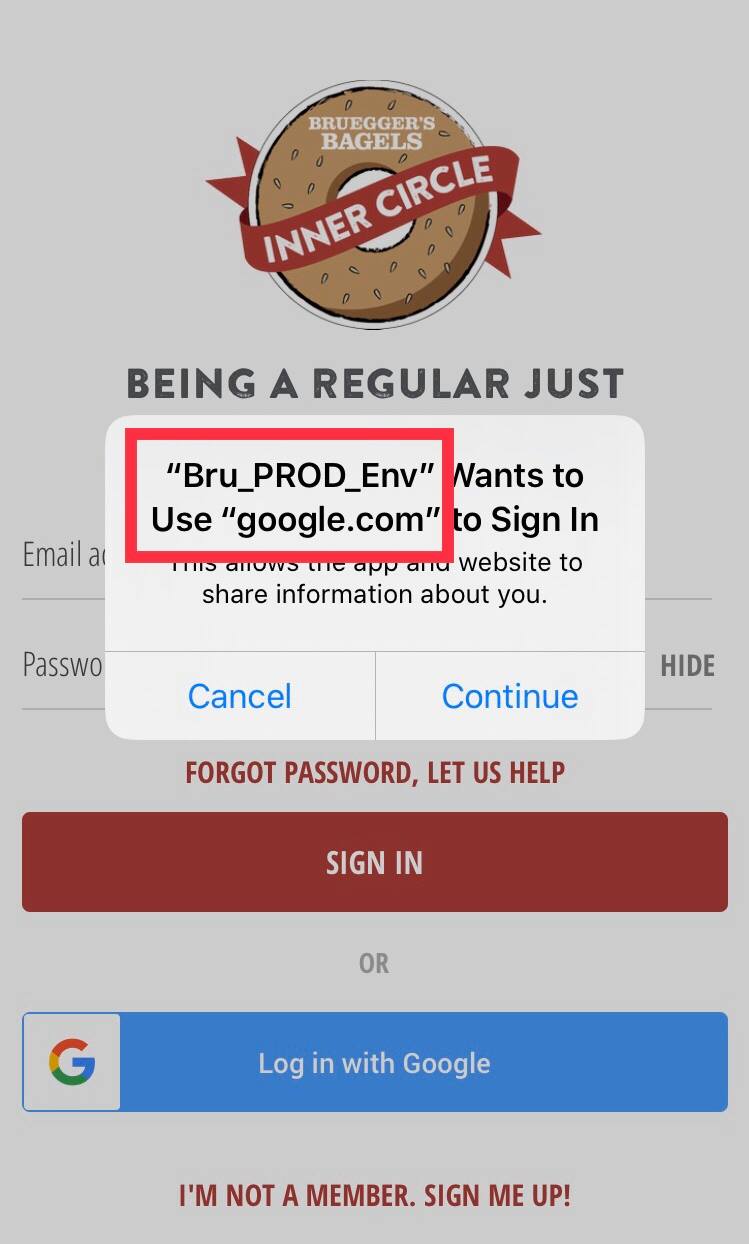
Like many apps the Bruegger's Bagels app has a "Sign up with Google" option to use Google account credentials to create a new account. After selecting this option, the app present a permission dialog to the user.

On this error message, the app is described as "Bru_PROD_Env" - as in "Bruegger's Production Environment." This is not a very user informative error message.

Take a look at the follow screenshot:


Steps to Reproduce:

1. Download and launch the Bruegger's Bagels app for iOS
2. Select the "Sign Up - Earn Rewards!" option in the upper right
3. Select "Sign up with Google"
4. Note the permission message states: "Bru_PROD_Env" Wants to use "google.com" to sign in"

Result: With the Bruegger's Bagels app for iOS, the Google sign-in message describes the app as "Bru_PROD_Env"

Expected: The Bruegger's Bagels app for iOS should change "Bru_PROD_Env" on the Google Sign-in message

Sunday, September 29, 2019

Edmunds app for iOS: Error Messaging: Canceling out of Google Sign in results in uninformative error message

Edmunds app for iOS (version 16.6)
Date: 09/29/2019

Description:

If the user cancels out of the Google sign-in prompt during account creation, an uninformative error message appears.

An error message of: "The operation couldn't be completed. (org.openid.ap-apauth.general.error -3.)" appears.

Take a look:


Steps to Reproduce:

1. Download and launch the Edmunds app for iOS (version 16.6)
2. Select the "Dashboard" option
3. From the "Have an account with Edmunds?" banner - select "SIGN IN"
4. Scroll down and select "Sign in with Google"
5. From the permission prompt, select "Cancel"

Result: An error message of "The operation couldn't be completed. (org.openid.ap-aputh.general.error -3.)" appears if the user cancels out of Google sign-in during account creation

Expected: A more user friendly error message