Scottsdale Restaurants iOS app (version 1.0.2)
Date: 11/20/2016
Description:
I downloaded the Scottsdale Restaurants iOS app onto my iPad Mini. I love the idea.
One minor complaint: the app continually crashes on the 'My Account' page, when I select the the three dot option in the upper right hand corner of the screen.
Please see the attached screenshots.
Steps to Reproduce:
1. Download the Scottsdale Restaurants iOS app
2. Create an account
3. Head to the 'My Account' page
4. Tap on the 3 dot link in the upper right
Result: The Scottsdale Restaurants iOS app crashes when you press the 3 dots on the 'My Account' page
Expected: Scottsdale Restaurants iOS app shouldn't crash on the 'My Account' page
(Having already created an account) Launch the Scottsdale Restaurants iOS app...
Select the sidebar option...
Select 'My Account'.....
The app crashes when you press the 3 dots.
Writing down random bugs to keep my mind limber.
Sunday, November 20, 2016
Thursday, November 17, 2016
Nom app - logging into account via the "Browse" feature
Nom app (nom, v 2.1.32 build 598) on an iPad Mini
Date: 11/18/2016
Description:
Creating a new account or logging into a pre-existing
account from the “JUST BROWSE” anonymous mode of the app doesn’t work that
well. If I log into my account via a prompt adding a comment, the app becomes
difficult to use after I log in.
The bottom menu icons disappear, and the size of all posts
is distorted. I’ve noticed this on several occasions now.
This is much easier to show than it is to describe, so
please see the attached screenshots.
Steps to Reproduce:
1.
Create a nom account – delete app from iPad
2.
Re-download the nom app
3.
Launch the app and select “JUST BROWSE”
4.
Select any photo
5.
Select the comment option for the photo
6.
Enter in any comment and select “Send”
7.
From the “You must be signed in to comment on
posts” option, select either “SIGN UP WITH EMAIL” or “Already have an account?
Sign in”
8.
Sign into account
Result: Signing into an account via a prompt from a comment
box during anonymous browsing of the app results in the app becoming distorted
Expected: No problems signing into account from a comment
box during anonymous browsing
Select the "JUST BROWSE" option, then choose a photo with comments, and attempt to add a comment...
Type something an select "Send"...
Log into your existing account..
The app will load for a second, looking like this...
Nom app on an iPad - how do I change location for a photo?
Nom (version 2.1.32)
Date: 11/17/2016
Description:
How am I supposed to check-in to another place?
I downloaded Nom, created an account, gave Nom permission to
access my location.
If I upload a photograph, I see it is tagged with the
location I gave for my account. If I try to change this, and check-in someplace
else, nothing happens. I just stay on a screen with options to check into other
places, but selecting a place doesn’t check me in!
Please see the attached screenshots.
1.
Download Nom, create account, give app location
and camera access
2.
Press the “+” option
3.
Select the square to search your camera roll
4.
Select photo from camera roll – Select “USE
PHOTO”
5.
Dismiss the automatically generated location
option – select “Add a location”
6.
From the Check-in screen, search for a location
7.
Select one of the returned results
Result: I cannot seem to select (change) one of the returned
locations on the Check-in screen in order to add a different location to a
photograph
Expected: I would like to be able to change locations for a
photograph I upload
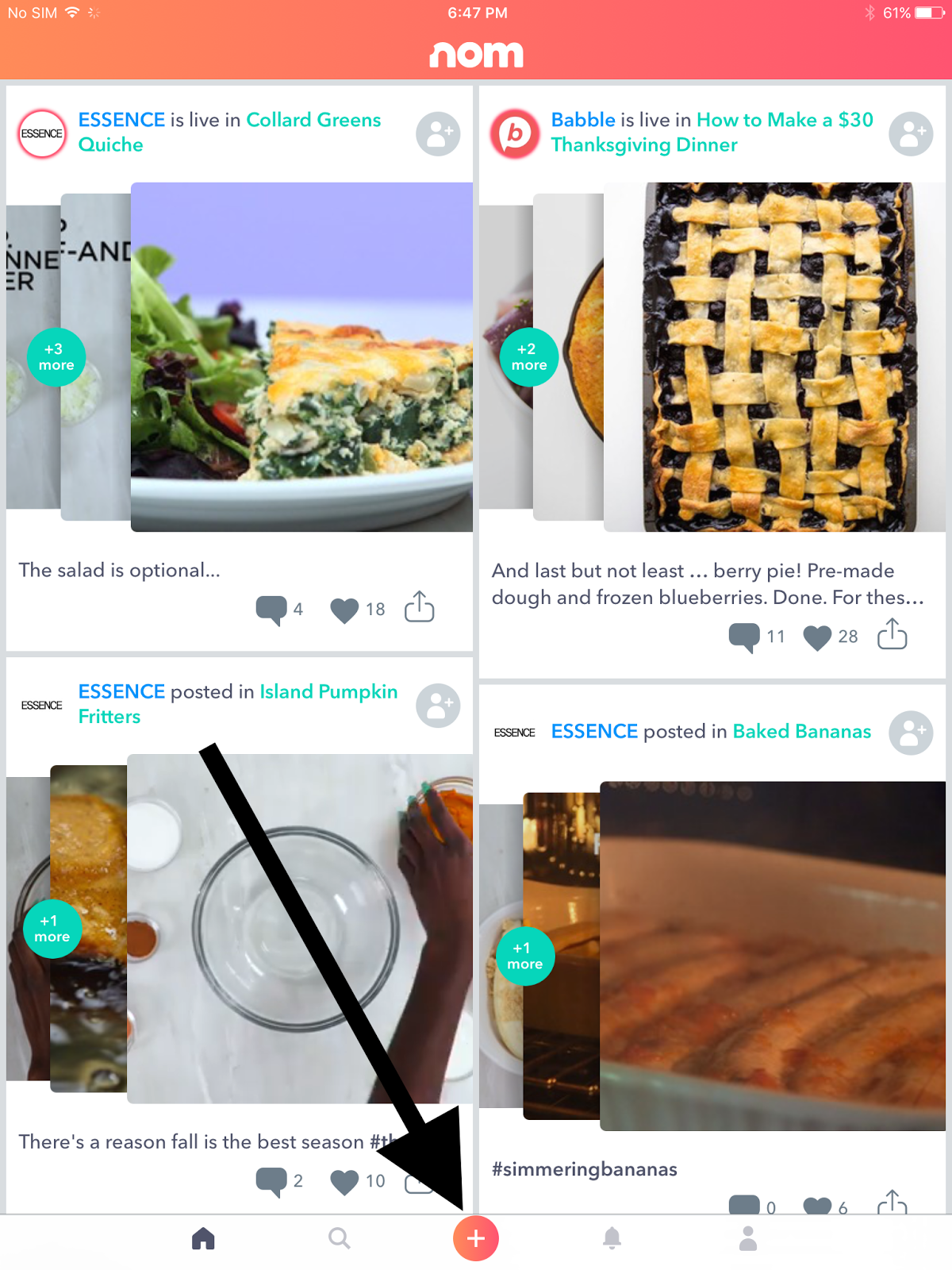
As you can see, I have granted location access to the Nom app...
I select the add option...
I select a photograph I want to upload...
I clear the location that appeared by default (I set this location for my profile)....
I tap the "Add a Location" option....
I cannot select (Check-in) to any place that appears.
As you can see, I have granted location access to the Nom app...
I select the add option...
I select a photograph I want to upload...
I clear the location that appeared by default (I set this location for my profile)....
I tap the "Add a Location" option....
I cannot select (Check-in) to any place that appears.
Monday, May 23, 2016
Ello on the iPad Mini - crashes when I try to share profiles
Ello app (version 1.7.1) on an iPad Mini.
Description:
I've been playing around with the Ello website for some time now. I downloaded the Ello app for the iPad Mini a couple months back. I enjoy it, but there is one minor crash that I continually get.
When I go to certain profiles in the app, there is (occasionally) an option to share the profile using the iOS option to bring up the twitter/facebook/e-mail clipboard option.
Whenenver this option is available for profiles on Ello, if I select it, the app crashes. If I see the sharing option, and I select it, I get this crash 100% of the time.
This is easier to show than it is to describe, so please see the attached screenshots.
Steps to reproduce:
1. Signed into an Ello account - launch the app
2. Select certain profiles (like @mskiabreanne)
3. Select the share option in the upper right
Result: Selecting the share option on certain profiles crashes the Ello app
Expected: Selecting the share option for certain profiles should not crash the Ello app
Any time I select the share option on a profile page, the app crashes for me...
Description:
I've been playing around with the Ello website for some time now. I downloaded the Ello app for the iPad Mini a couple months back. I enjoy it, but there is one minor crash that I continually get.
When I go to certain profiles in the app, there is (occasionally) an option to share the profile using the iOS option to bring up the twitter/facebook/e-mail clipboard option.
Whenenver this option is available for profiles on Ello, if I select it, the app crashes. If I see the sharing option, and I select it, I get this crash 100% of the time.
This is easier to show than it is to describe, so please see the attached screenshots.
Steps to reproduce:
1. Signed into an Ello account - launch the app
2. Select certain profiles (like @mskiabreanne)
3. Select the share option in the upper right
Result: Selecting the share option on certain profiles crashes the Ello app
Expected: Selecting the share option for certain profiles should not crash the Ello app
Any time I select the share option on a profile page, the app crashes for me...
Thursday, April 21, 2016
Her Story game on the iPad Mini - crashes when I use the keyboard's microphone button at tag entry
Her Story game (version 1.1) on an iPad Mini.
Description:
I purchased and downloaded the game Her Story onto my iPad Mini. I can understand why it has received the accolades that it has - it is a very interesting and unique game.
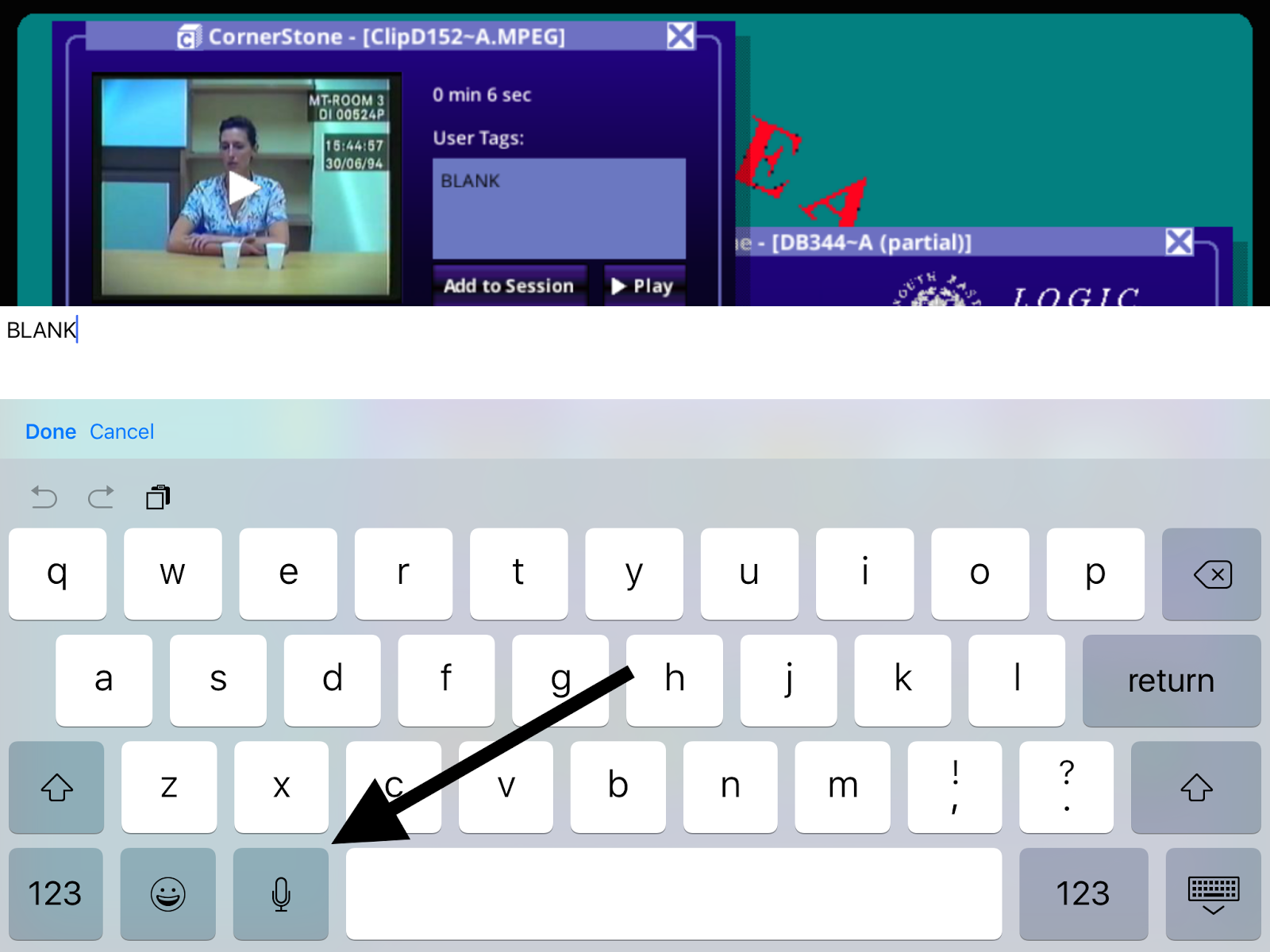
I do have one minor complaint, however. If I select any of the videos in the game, there's an option to add a tag to that video. When you add a tag, the iPad's keyboard pops up. If I select the microphone button, the game crashes.
Not a huge deal, but I noticed it very quickly. Please see the attached screenshots.
Steps to Reproduce:
1. After having progressed through the game for a while, re-launch the game
2. Select any video
3. Select the "User Tags:" text box
4. With the iOS keyboard extended, press the keyboard's microphone button
Result: The Her Story game crashes on my iPad Mini when I press the microphone button on the iOS keyboard from the tag area of videos
Expected: Game shouldn't crash when I press the microphone button on the keyboard
Purchase the Her Story game...
Select any of the videos...
Select the "User Tags:" input box. Once you do, a keyboard will appear...
Select the microphone button from the keyboard. This crashes the game for me.
Description:
I purchased and downloaded the game Her Story onto my iPad Mini. I can understand why it has received the accolades that it has - it is a very interesting and unique game.
I do have one minor complaint, however. If I select any of the videos in the game, there's an option to add a tag to that video. When you add a tag, the iPad's keyboard pops up. If I select the microphone button, the game crashes.
Not a huge deal, but I noticed it very quickly. Please see the attached screenshots.
Steps to Reproduce:
1. After having progressed through the game for a while, re-launch the game
2. Select any video
3. Select the "User Tags:" text box
4. With the iOS keyboard extended, press the keyboard's microphone button
Result: The Her Story game crashes on my iPad Mini when I press the microphone button on the iOS keyboard from the tag area of videos
Expected: Game shouldn't crash when I press the microphone button on the keyboard
Purchase the Her Story game...
Select any of the videos...
Select the "User Tags:" input box. Once you do, a keyboard will appear...
Select the microphone button from the keyboard. This crashes the game for me.
Monday, February 15, 2016
Goodreads app on the iPad Mini freezes on Goodreads account log-in screen
Goodreads (version 3.3) on an iPad Mini
Description:
Keep getting an interesting bug with the Goodreads app on my iPad Mini.
Basically, the app gets frozen on a screen that is asks for my preexisting Goodreads account. I cannot back out, I can't access the "Forgot your password?" option, can't select any of the options on the bottom of the screen.
I've had to delete the app and re-download in order to get it working again. Reboot the iPad might, but I don't like doing that.
This bug is much easier to show than to describe, so please see the attached screenshots.
Steps to Reproduce:
1. Download the Goodreads app (version 3.3) on an iPad Mini
2. Dismiss the Updated Book Page pop-up
3. Select "Sign Up"
4. Select "Sign Up with Amazon"
5. Sign into an Amazon account - using "Sign into Amazon" button
6. From the "Do you have a Goodreads account?" prompt, select "Yes"
7. From the "Meet your next favorite book." page, select "Sign In"
8. Dismiss the invalid email address error message
Result: App freezes after an "invalid email address" appears on the "Meet your next favorite book." account sign-in screen
Expected: App should not freeze after the user receives an "invalid email address" error message on the "Meet your next favorite book." screen
Download the Goodreads app on an iPad Mini...
Select the "Get Started" option...
Select the "Sign Up with Amazon" option...
Enter in Amazon account credentials, then click on "Sign into Amazon"
Select "Yes"
Press the "Sign in" button.
Select "OK" from this error message...
Completely frozen screen!
Description:
Keep getting an interesting bug with the Goodreads app on my iPad Mini.
Basically, the app gets frozen on a screen that is asks for my preexisting Goodreads account. I cannot back out, I can't access the "Forgot your password?" option, can't select any of the options on the bottom of the screen.
I've had to delete the app and re-download in order to get it working again. Reboot the iPad might, but I don't like doing that.
This bug is much easier to show than to describe, so please see the attached screenshots.
Steps to Reproduce:
1. Download the Goodreads app (version 3.3) on an iPad Mini
2. Dismiss the Updated Book Page pop-up
3. Select "Sign Up"
4. Select "Sign Up with Amazon"
5. Sign into an Amazon account - using "Sign into Amazon" button
6. From the "Do you have a Goodreads account?" prompt, select "Yes"
7. From the "Meet your next favorite book." page, select "Sign In"
8. Dismiss the invalid email address error message
Result: App freezes after an "invalid email address" appears on the "Meet your next favorite book." account sign-in screen
Expected: App should not freeze after the user receives an "invalid email address" error message on the "Meet your next favorite book." screen
Download the Goodreads app on an iPad Mini...
Select the "Get Started" option...
Select the "Sign Up with Amazon" option...
Enter in Amazon account credentials, then click on "Sign into Amazon"
Select "Yes"
Press the "Sign in" button.
Select "OK" from this error message...
Completely frozen screen!
Wednesday, February 10, 2016
Kelli Ward 2016 app - Terms of Service and Privacy Policy links on the sign-in page lead to 404s
Kelli Ward for U.S. Senate app (version 1.2.0)
Description:
The "Terms of Service" and "Privacy Policy" links on the Kelli Ward 2016 app lead to 404 pages. Not good that a political app doesn't take users to a readable TOS or Privacy Policy.
Please see the attached screenshots.
Steps to Reproduce:
1. Download and launch the Kelli Ward for U.S. Senate app (version 1.2.0)
2. Select either "Terms of Service" or "Privacy Policy" from the red sign-in page
Result: The "Terms of Service" and "Privacy Policy" links on the Kelli Ward 2016 app's sign-in page take the user to a 404 page
Expected: Working "Terms of Service" and "Privacy Policy" links on the Kelli Ward 2016 sign-in page
Launch the Kelli Ward 2016 app...
Select either "Terms of Service" or "Privacy Policy"
404 page.
Description:
The "Terms of Service" and "Privacy Policy" links on the Kelli Ward 2016 app lead to 404 pages. Not good that a political app doesn't take users to a readable TOS or Privacy Policy.
Please see the attached screenshots.
Steps to Reproduce:
1. Download and launch the Kelli Ward for U.S. Senate app (version 1.2.0)
2. Select either "Terms of Service" or "Privacy Policy" from the red sign-in page
Result: The "Terms of Service" and "Privacy Policy" links on the Kelli Ward 2016 app's sign-in page take the user to a 404 page
Expected: Working "Terms of Service" and "Privacy Policy" links on the Kelli Ward 2016 sign-in page
Launch the Kelli Ward 2016 app...
Select either "Terms of Service" or "Privacy Policy"
404 page.
Subscribe to:
Posts (Atom)