Monday, July 10, 2023

Threads app for iOS: Naming Conventions: "WhatsApp" is presented as "Whatsapp"

 iOS 16.5

Threads app for iOS (version 

Date: 07/07/2023

Description:

Naming convention issue inside of the Threads app. The Threads app has an error message that looks like this:


As you can see "WhatsApp" is displayed with a lower case "a." This is an incorrect representation of the "WhatsApp" brand. 


Steps to Reproduce:

1. Enter into the app - login with IG account

2. Select the person/profile option in the bottom right hand of the screen

3. From the "Settings" page select "Follow and invite friends"

4. From the "Follow and invite friends" page select "Invite friends by WhatsApp"

5. From the ""Threads" wants to open "WhatsApp" prompt, select "Cancel"

6. Note the error message: "Couldn't open Whatsapp" 

Result: An error message inside of the Threads app displays the term "Whatsapp"

Expected: The term "Whatsapp" should not appear in the app as "WhatsApp" is recognized as "WhatsApp"


Threads app for iOS - WhatsApp error message
Select "Follow and invite friends"


Select "Invite friends by WhatsApp"


Select "Cancel"


Saturday, June 10, 2023

Vocal app for iOS: Error Message from the Twitter Authorization Page

 iOS 16.5

Vocal app for iOS (version 1.10.1)

Date: 06/10/2023

Description:

The Twitter authorization option with the current version of Vocal does not work at the moment. The following error message is displayed:


Steps to Reproduce:

1. Download and launch the Vocal app for iOS

2. Select the "Sign In or Join Vocal" option 

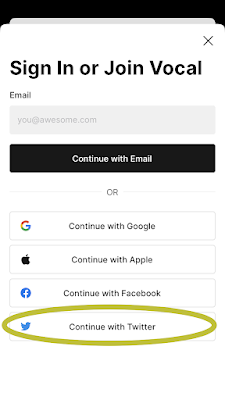
3. From the "Sign In or Join Vocal" pop-up select the "Continue with Twitter" option 

4. From the "Vocal" Wants to Use" pop-up select "Continue"

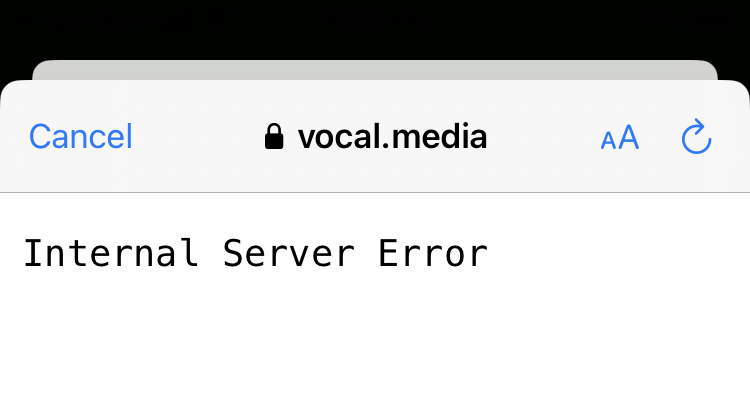
5. Note the error message that states: "Internal Server Error"

Result: There Twitter authorization page that the Vocal app displays shows an error message of "Internal Server Error"

Expected: The Twitter authorization page that the Vocal app displays should either work - or the Twitter option to create a Vocal account should be removed 


See the screenshots below:

Vocal app for iOS
Download and launch the Vocal app for iOS

Select the "Sign in or Join Vocal" option 

Select the "Continue with Twitter" option...


Select the "Continue" option...

Error message - Twitter Authorization not working...

Internal Server Error message 


Saturday, May 13, 2023

KOLLYY - Clothing & Fashion app for iOS: Facebook login leads to a missing Authorization page inside the Facebook iOS app

 iOS 16.4.1 (a)

KOLLYY - Clothing & Fashion app for iOS (version 3.0.9)

Date: 05/13/23

An app called KOLLYY for iOS has a non-working Facebook login. After selecting the Facebook option from inside the KOLLYY app, the user is taken to a not-found page


The same problem reproduces on web:


Steps to Reproduce:

1. (with the FB iOS app on the phone) Download and launch the KOLLYY app for iOS

2. Select "Me"

3. Select "Sign In/Register >"

4. Select the Facebook option 

5. From the "KOLLYY Wants to Use Facebook" pop-up select "Continue"

6. From the "Open in Facebook" pop-up select "open"

7. Note the "It looks like this app isn't available" error message

Result: The Facebook login path from inside he KOLLYY app to Facebook is broken. Select the Facebook login option from inside the KOLLYY app takes the user to a non-working page 

Expected: Facebook login and account creation with the KOLLYY app should work correctly 


KOLLYY app for iOS

Launch the KOLLYY app...


Choose the Facebook login option...


Select the "Continue" option from the pop-up...

KOLLYY app

Select "Open"...


Facebook login isn't working. Problem on KOLLYY's end. 


Thursday, April 27, 2023

Perplexity app for iOS: Bad response for European Train Route Query

 iOS 16.3.1

Perplexity - Ask Anything app for iOS (version 1.3.0)

Date: 04/27/2023

Description:

I don't think the response that Perplexity gives to these two questions is accurate or appropriate.

Here's the query:

What's the longest train route in the European Union? 


Here's the response:


The response.

Here's the problem with this response: The train route they mention runs from Adler to Vorkuta, Russia. 


Russia, of course, is not a member of the European Union, and the train line appears to run entirely in Russia.  

The response to "What is the longest train route in the European Union" should NOT be this line. 

Steps to Reproduce:

1. Open the Perplexity app for iOS
2. Ask: "What is the longest train route in the European Union"

Result: Perplexity's response to, "What is the longest train route in the European Union" is a train route in Russia. 

Expected: Perplexity's response to "What is the longest train route in the European Union" query should be train route that begins and ends within the boundaries of the European Union 


Thursday, April 6, 2023

Lemon8 app for iOS: Auto-Generate Tweets from sharing City Specific Lemon8 Posts Have Dead Links

 iOS 16.3.1

Lemon8 app for iOS (version 3.9.1)

Date: 04/06/2023

Description:

Minor problem with the Lemon8 app and the auto-generate tweet that is created when sharing a Lemon8 posts tagged from a particular city.

There's a lack of a space between the #Lemon8 and the URL in the auto-generated tweet. This results in the URL in the tweet being inactive. 

This is easier to show than to describe, so take a look:

The Lemon8 app allows you to browse posts by city. Here's Denver. The arrow in the upper right lets a user share this...


Select the Twitter option from the iOS share sheet...


The URL in the Tweet is inactive (dead)

Steps to Reproduce:

1. Download and Launch the Lemon8 app 
2. In the input box, search for a city (example: "Denver")
3. Click on a Location-tagged Lemon8 post
4. Select the city tag
5. Share the city tag to Twitter (using iOS share sheet)

Result: The URL in auto-generated tweets about cities is inactive

Expected: The URL in auto-generated tweets about cities should not inactive 


Wednesday, March 29, 2023

Lemon8 app - Twitter auth login page's Privacy Policy link opens app to user content

iOS 16.3.1

Lemon8 app for iOS (version 3.9.1)

Date: 03/29/2023

Description:

Here it is: without a doubt, the funniest bug you will ever see involving a Twitter Auth page accessed by an iOS app during account creation. 

In essence, a "privacy policy" link does not take a user to Lemon8's written privacy policy. Instead, the app is somehow redirecting from this link: 

https://www.lemon8-app.com/legal/privacy

To user content inside of the app located at this link:

https://www.lemon8-app.com/sxxte___cxxc/privacy?language=en&mid=7215984217704203269&open_url=c25zc2RrMjY1NzovL2FydGljbGVfZGV0YWlsX3BhZ2U%2FZ3JvdXBfaWQ9NzE3NTIwOTQwNTM3NjM2NTA2MiZhcHBfbGF1bmNoX2J5PVNoYXJlK1BhZ2UrTGluayZtZWRpYV9pZD03MTc0NDIxMDM0NzIwMDM1ODQ1JnBpZD1zaGFyZV9hbCZjYW1wYWluX2lkPWFydGljbGU%3D&region=us&ui_language=en

This literally made me laugh at loud. As someone who has assiduously looked at privacy policy links, I knew had to save this one for posterity. 

Take a look:


Lemon8 twitter auth page
On an iPhone that has the Lemon8 app installed, open a mobile browser (to: https://api.twitter.com/oauth/authorize?force_login=false&oauth_token=ytWG6AAAAAABB_8DAAABhy4_QgY) and click on the "privacy policy" link

The app opens up to user content?

Here's a video of what it looks like:


Two easy ways to get this to reproduce. The longer way first, the shorter way second:


Steps to Reproduce:


  1. (on an iPhone with the Twitter iOS app installed) download and launch Lemon8

  2. Enter in an age-appropriate birthday

  3. Advance to the Create Account screen 

  4. Select the “Continue with Twitter” option 

  5. From the “Lemon8” wants to open Twitter” prompt, select “Open”

  6. From the “Authorize Lemon8 to access your account?” in-app prompt, select “cancel”

  7. User is returned to the Lemon8 app, where an api.twitter.com auto page appears 

  8. From the api.twitter.com prompt, select the “Privacy Policy” link

  9. Select “Done”


Result: Lemon8 app displays a video labeled “PRIVACY” instead of taking the user to Lemon8’s written privacy policy link after the “privacy policy” link is selected an an api.twitter.com auth login page


Expected: User should always, under all conditions, be taken to a written privacy policy after selecting a “privacy policy” link associated with Lemon8


Shorter Method to Reproduce:


  1. Download the Lemon8 app onto an iPHone

  2. On that iPhone, open a mobile browser and head to Lemon8’s twitter authorization page (https://api.twitter.com/oauth/authorize?force_login=false&oauth_token=ytWG6AAAAAABB_8DAAABhy4_QgY

  3. From Lemon8’s twitter auth page, select the “privacy policy” link 

  4. Note user is taken back into the Lemon8 app to a video labeled “Privacy”


Result: the “privacy policy” link on Lemon8’s twitter authorization page opens the Lemon8 to a video labeled “PRIVACY” instead of to the written privacy policy 


Expected: the “privacy policy” link on Lemon8’s twitter authorization page should always open to the written privacy policy


Thursday, March 2, 2023

Rumble app for iOS: Error Message after accessing the Privacy Policy or Terms of Service link from the FB login

 iOS 16.3.1

Rumble app for iOS (version 2.8.1)

Date: 03/02/23

Description:

There is an unusual problem with the Rumble app for iOS. I have, in fact, never seen this problem happen with another iOS until now. 

Like most other apps, the Rumble app has a Facebook login option. If selected, and if the user has the Facebook iOS app on the device, the user will be taken to a Facebook authorization screen inside of the Facebook iOS app.

This authorization login screen has two links: a "Privacy Policy" link and a "Terms of Services" link. It looks like this:


Steps to Reproduce:

1. Download and launch the Rumble app 

2. From the Rumble Sign In screen, select the "Sign in with Facebook" option 

3. From the "Rumble-iOS Wants to Use" pop-up, select the "Continue" option 

4. From the "Open in Facebook option" select "Open"

5. From the "Rumble is requesting access to;" FB login screen, select either "Privacy Policy" or "Terms of Service"

6. Select the back (Left) arrow to return to the previous screen 

7. Note the "The page you requested was not found." error message

Result: Returning from either the "Privacy Policy" or "Terms of Service" results in an error message - user cannot login into the Rumble app

Expected: Users should be able to read Rumble's "Privacy Policy" and "Terms of Service" documents and then completed the Facebook login-authorization process 


Select the "Sign in with Facebook" option...

Select the "Continue" option from this prompt...

Select "Open" from this prompt...

Select these links...

Back out of the Privacy Policy...

Stuck on an error message. I have never, ever seen this with any other apps.