Showing posts with label Twitter oauth. Show all posts

Wednesday, September 4, 2024

Lemon8 app for iOS: Twitter Account Creation Does Not Work

UPDATE:


When I checked today (11/03/2024) the option to use Twitter for account creation appears to have been removed from the app:


Downloaded the latest version this morning...


Witter option removed. 

Guess that's that....


____________________________________________________________________________________

 iOS: 17.6.1

Lemon8 app for iOS (version 7.1.0)

Date: 09/04/2024

Description:

Lemon8 account creation is not working with the iOS app. There is a "Continue with X" option for account creation. While the other options all work, the Twitter option does not. 

Selecting this option results in the following error message:

Twitter account creation isn't working - hasn't worked for several weeks. This is the error message. 


Note: This problem does NOT reproduce with the Lemon8 app for Android. This also reproduced with the Twitter app removed from the phone. 

Steps to Reproduce:

1. Download the Lemon8 app for iOS (version 7.1.0)

2. Advance to the home screen

3. Select the Profile icon in the bottom right 

4. From the "Lemon8 - Create account or log in" screen scroll down and select "Continue with X"

Result: It is not possible to use the "Continue with X" option to create a Lemon8 account using the Lemon8 iOS account

Expected: The user should be able to use the "Continue with X" option to create a new Lemon8 account using the Lemon8 iOS app 

Saturday, June 10, 2023

Vocal app for iOS: Error Message from the Twitter Authorization Page

 iOS 16.5

Vocal app for iOS (version 1.10.1)

Date: 06/10/2023

Description:

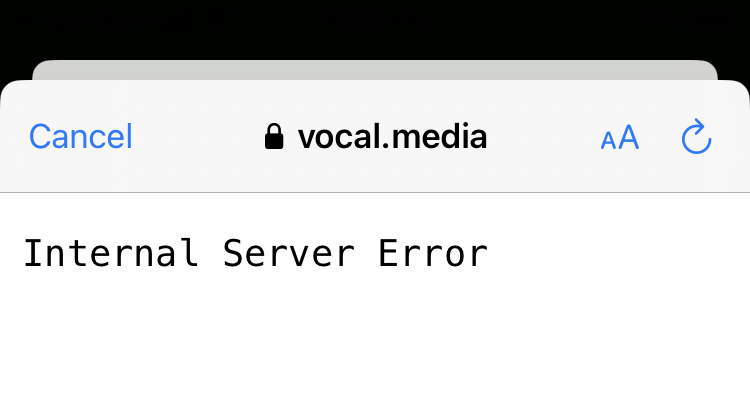
The Twitter authorization option with the current version of Vocal does not work at the moment. The following error message is displayed:


Steps to Reproduce:

1. Download and launch the Vocal app for iOS

2. Select the "Sign In or Join Vocal" option 

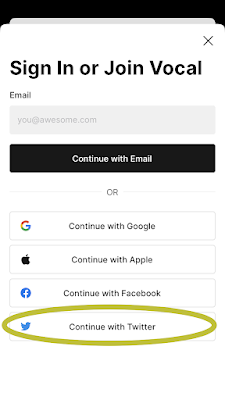
3. From the "Sign In or Join Vocal" pop-up select the "Continue with Twitter" option 

4. From the "Vocal" Wants to Use" pop-up select "Continue"

5. Note the error message that states: "Internal Server Error"

Result: There Twitter authorization page that the Vocal app displays shows an error message of "Internal Server Error"

Expected: The Twitter authorization page that the Vocal app displays should either work - or the Twitter option to create a Vocal account should be removed 


See the screenshots below:

Vocal app for iOS
Download and launch the Vocal app for iOS

Select the "Sign in or Join Vocal" option 

Select the "Continue with Twitter" option...


Select the "Continue" option...

Error message - Twitter Authorization not working...

Internal Server Error message 


Wednesday, September 16, 2020

Triller: Social Video Platform app for iOS: Privacy Policy and Terms and Conditions links connect to a 404 page

 iOS 13.7

Triller: Social Video Platform app for iOS (version 14.3)

Date: 09/16/20


Description:

Minor issue with the Triller app and their Twitter authorization page. On this page, Triller's Privacy Policy and Terms and Conditions links lead to 404 error messages. 

These both should be working on the Twitter Oauth page.


Steps to Reproduce:

1. Download and launch the Triller app for iOS

2. Select the profile icon in the bottom right

3. Select the red "Sign Up/log in" button

4. Choose the Twitter option 

5. From the Twitter Oauth page, scroll down and click on either "Privacy Policy" and "Terms and Conditions" 

Result: The "Privacy Policy" and "Terms and Conditions" links lead to 404 error messages 

Expected: The "Privacy Policy" and "Terms and Conditions" links on Triller's auth form


Scroll down on this page...

Click on either the "Privacy Policy" or "Terms and Conditions" links...

Error page...


Thursday, July 23, 2020

Brick & Portal app for iOS: Twitter account creation does not work

iOS 13.6
Brick & Portal app for iOS (version 1.3)
Date: 07/23/20

Description:

Minor problem with the Brick & Portal app for iOS. The Twitter icon for account creation does not work:


In short, the user can't use their Twitter credentials to create an account. Selecting the Twitter icon doesn't bring up the Twitter Oauth.

Steps to Reproduce:

1. Download and launch the app
2. Select the Twitter icon under "Sign up with..."

Result: The Twitter icon doesn't work for account creation - does not activate the Twitter Oauth

Expected: The Twitter icon should lead to account creation

Sunday, July 5, 2020

Kwai app for iOS: Privacy Policy and Terms and Conditions links are dead

iOS 13.5.1
Kwai app for iOS (version 2.30.1)
Date: 07/05/20

Description:

An app called Kwai has a common problem. Two links, the Privacy Policy and the Terms and Conditions links, on the Twitter Oauth log-in page are dead.

Clicking on these two links:

Does nothing. The links are dead. These really should be working links, especially if the Twitter permissions requested are overly intrusive. This is the the last chance that an end user has to browse Kwai's Privacy Policy and Terms and Conditions before signing in with their Twitter credentials.

Steps to Reproduce:

1. Download and launch the Kwai app for iOS
2. Select the "More options >" link
3. Select the "Twitter" icon
4. From the Twitter Oauth page, click on the "Privacy Policy" and "Terms and Conditions"

Result: The "Privacy Policy" and "Terms and Conditions" links on the Twitter Oauth page are not working - they are dead links

Expected: The "Privacy Policy" and "Terms and Conditions" links on the Twitter Oauth page should be working - should not be dead, should take the user to valid pages

Launch the Kwai app for iOS...

Select the "More Options >" link...

Select the "Twitter" link...

Two non-working links.


Tuesday, June 9, 2020

BIGO LIVE for iOS: BIGO LIVE's Privacy Policy and Terms and Conditions links are dead on Twitter Oauth page

iOS 13.5
BIGO LIVE for iOS (version
Date: 06/09/20

Description:

I just wrote about I what I believe to be the overly intrusive Twitter permissions requested by the BIGO LIVE app for iOS.

There's another issue. When a user exits the iOS app to BIGO LIVE's Twitter Oauth page, there are two dead links. BIGO LIVE's "Privacy Policy" and "Terms and Conditions" links on the Oauth page are dead.

Take a look at this screenshot:

The arrows in the screenshot are pointing to two dead links. These links are supposed to link to BIGO LIVE's Privacy Policy and Terms and Conditions. This is provided as one last opportunity for the user to browse these conditions, before handing over authorization for BIGO LIVE to access the user's Twitter account.

These links really should be working. The fact that they are not working when the app is asking for such intrusive access is troubling.

Steps to Reproduce:

1. Download the app
2. Choose the Twitter option to create an account
3. From BIGO LIVE's Twitter Oauth page, click on the "Privacy Policy" or "Terms and Conditions" links

Result: The "Privacy Policy" and "Terms and Conditions" links on BIGO LIVE's Twitter Oauth login page do not work - they do not link to BIGO LIVE's legal information

Expected: The "Privacy Policy" and "Terms and Conditions" links on BIGO LIVE's Twitter Oauth login page really should be working

BIGO LIVE app for iOS: Overly intrusive Twitter permissions required to create an account or share content

iOS 13.5
BIGO LIVE app for iOS (version 4.36.1)
Date: 06/09/20

Description:

BIGO LIVE is a live streaming app that is currently #35 in the social media networking section of the Apple App Store. I had to do a little research to find out more about this company.

According to an article I stumbled across, the term "BIGO" is acronym that stands for "Before I Get Old."

However, one thing really stuck out to me after I download the app. I saw that like TikTok before it, it had an unusual set-up to share videos via Twitter. In my opinion, there appears to be a concerted effort to allow Twitter users to browse videos, and then hook them into granting third party access to their twitter accounts if user wants to simply share a video.

Take a look at what BIGO LIVE requires of people who try to either share content via Twitter, or who want to user their Twitter credentials to create an account:

Their Twitter Oauth page requires Twitter users to allow the BIGO LIVE app to "Send Direct Messages for you and read, manage, and delete your Direct Messages."

Yikes! Full and complete access to Twitter DMs. Access to anything and everything that might be in your average millennial's Twitter DMs is what's required to sign up for this app. Not only that, but full DM access is required to even share a video from the app to Twitter!

Here's a video of the Twitter Oauth a user (who created an account using a different method) sees when trying to share a video to Twitter from inside the BIGO LIVE app...


Last Summer, I spotted the same exact behavior and set-up with TikTok. I sent an email to TikTok corporate. I knew they would just ignore an email, so I made sure to overtly CC European based privacy regulators and American academics. And, of course, TikTok quickly removed the option and claimed that it was a mistake to even ask for the permission.

This probably will also be the case with BIGO LIVE. I will shortly draft an email to BIGO LIVE's legal department. I will make the same arguments that I did with TikTok, and i'll CC some of the same people.

So, wait and see. Perhaps these permission requirements will be changed soon. Perhaps not. We'll see.

Steps to Reproduce:

1. Download and launch the BIGO LIVE app for iOS
2. Choose the Twitter option for account creation
3. Note that the Oauth page requires read/manage/delete direct message access to Twitter DMs

OR:

1. Launch the app
2. Create an account using Google or Facebook login
3. Browse videos
4. Select the share option
5. Select Twitter
6. Head to Oauth page and notice that the app requests read/manage/delete direct message access to Twitter DMs

Result: The BIGO LIVE app for iOS requires full read/manage/delete direct message access to the Twitter direct messages of users who want to user the Twitter credentials to either create an account or share a video

Expected: The requirement of read/manage/delete access to twitter direct messages is too intrusive. I have yet to read any valid justification for a third party app requesting this access. I believe that there is even less reason for a streaming app targeted to young people to request this

Thursday, April 30, 2020

TikTok Account Creation and Twitter: Privacy Policy and Terms and Conditions Links are Dead

iOS 13.4.1
TikTok app for iOS (version 15.9.1)
Date: 04/30/20

Description:

Here's an issue that similar to something that was happening over the summer.

TikTok allows users to use Twitter to create accounts. When the user selects the Twitter option to create an account, the user is take to a Twitter Oauth page.

Below, you'll see what it looks like at this very moment:


Steps to Reproduce:

1. Download the TikTok app for iOS
2. Select the "me" option in bottom right
3. Select the "Sign Up" button
4. From the "Sign up for TikTok" page, select the "Continue with Twitter" option
5. From the "Authorize TikTok" twitter Oauth page, scroll down
6. Select either the "Privacy Policy" or "Terms and Conditions" link

Result: TikTok's Twitter Oauth page has two dead links: Privacy Policy and Terms and Conditions

Expected: The Privacy Policy and Terms and Conditions links on the Twitter Oauth page should link to TikTok's pages