Sunday, December 25, 2022

IZIon24: Bảo hiểm bỏ túi app for iOS: FAQ section in Guest Mode crashes the app

iOS 16.2

Date: 12/25/22

IZIon24: Bảo hiểm bỏ túi app for iOS (version 1.0.84)

Description:

IZIon24: Bảo hiểm bỏ túi is a Vietnamese insurance app that is available to download from the Apple App Store. The app has English and Vietnamese language options. 

The app seems to always crash when the user selects the "Guest Mode" option, and then selects the FAQ.

Take a look at the following screenshots:

Screenshot of the login page for an app called IZIon24: Bảo hiểm bỏ túi

Select the "Continue as Guest" option at the bottom of the screen....


Select the "FAQ" - the app will crash.


Steps to Reproduce:

1. Download and launch the IZIon24: Bảo hiểm bỏ túi app for iOS

2. Select the "Continue as Guest" option (English or Vietnamese)

3. Select the "FAQ"

Result: Selecting the FAQ in theIZIon24: Bảo hiểm bỏ túi app for iOS crashes the app

Expected: Select the FAQ should not crash the app 

Sunday, October 16, 2022

Facebook app for iOS: Blocking accounts using in-app blocking option results in white screen of death

iOS 16.0.3

Facebook app for iOS (version 388.0)

Date: 10/16/2022

Description:

Here's a problem that I encountered today with the current version (388.0) of the Facebook app for iOS. If the user uses the block option that is presented when reporting an account for a violation of community standards, the app frequently (always?) ends up in an unresponsive state with a "white screen of death" being displayed to the user.

I got this problem to reproduce on an iPhone 8 running iOS 16.0.3 and an iPhone 6 running iOS 15. This problem is reproducing with the current version of the Facebook iOS app:


I managed to take a video of the problem, which I uploaded to Twitter:


Steps to Reproduce:

1. Launch the current version of the Facebook app for iOS (version 388.0)

2. Become perturbed by a Facebook account 

3. Report the account using the "Report profile" feature  

4. Report the account as a "Fake account"

5. From the "Does this go against our Community Standards?" prompt select "Submit"

6. From the "Thank you, we've received your report" prompt select "Next"

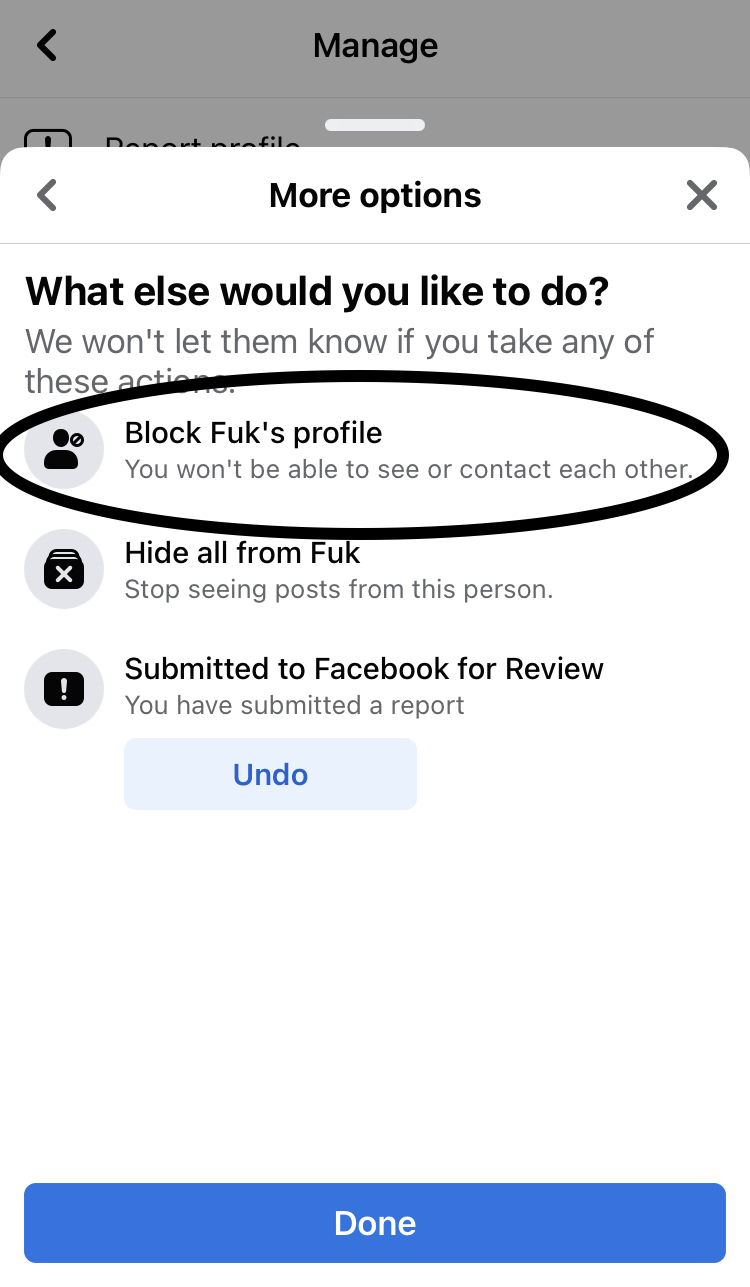
7. From the "What else would you like to do?" prompt select "Block ______'s profile" then select "Done"

8. From the "Block ________?" prompt select "Block"

Result: Blocking accounts using the in-app block feature results in the Facebook app becoming stuck in an unresponsive state 

Expected: Blocking accounts using the in-app blocking featured should NOT result in the Facebook app becoming unresponsive 


Here's a Facebook account with an offensive name that is engaged in behavior that likely violates community standards.

Report this account as a "fake account"

Report the account for violating community standards...

Select "Next"

Select the Block option from this option screen...


Select the "Block" option - app becomes unresponsive on a white screen of death.


Saturday, September 24, 2022

Zalando app for iOS: "Share our app" option does not work using Facebook Messenger - no link is generated

 iOS 16

Zalando app for iOS (version 22.12.0)

Date: 09/23/22

Description:

Minor problem with the "Share our app" feature. There is no link to the app if the user attempts to share using Facebook Messenger from the iOS Share Sheet.

The "Share our app" option creates a working link when using the email/text message/Facebook options. There is no working link when sharing using Facebook Messenger.

Steps to Reproduce:

1. Download the Zalando app for iOS 

2. Select the person figure in the bottom right

3. From the "APP SETTINGS" screen select "Share our app"

4. From the iOS Share Sheet select Facebook Messenger 

Result: No link is generated when using the Facebook Messenger option from the iOS Share Sheet to share an invitation to download the Zalando app

Expected: There should always be a link to download the Zalado app

Select the "Share our app" option...

There's no auto-generated link. It should be this link: https://apps.apple.com/app/id585629514


No link to the app!

The email invite has a link. 


Tuesday, August 30, 2022

Tastemakers app for iOS: Privacy Policy link in app store does not lead to written Privacy Policy

iOS 15.6.1 

Date: 08/30/2021

Tastemakers Restaurant Reviews app for iOS (version 1.2.0)

Description:

The Privacy Policy link in the app store listing for Tastemakers Restaurant Reviews does not lead to a written privacy policy.


Steps to Reproduce:

1. Head to the Apple app store listing for Tastemakers Restaurant Reviews 

2. Click on the "developer's privacy policy" link

3. Note the lack of a written policy on the destination page: https://tastemakersapp.com/

Result: The "developer's privacy policy" link for Tastemakers Restaurant Reviews does not lead to a written privacy policy 

Expected: Per app store rules, each app listing should lead to an "accessible" privacy policy


Head to the product listing for the Tastemakers app for iOS


Click on the "developer's privacy policy" link...


No written privacy policy is to be found. 


Wednesday, August 17, 2022

Snap! Raise Website Cookie Pop-Up: Dead Privacy Policy Link

Date: 08/17/2022

Note: This isn't an issue with an app - it's an issue with a pop-up I received using Mobile Safari. Also reproduced on a Chromebook.

Description:

The "Privacy Policy" link in the Cookie pop-up is dead. When selected using Safari Mobile, user is taken to a blank screen.

See screenshots:

There is a "Privacy Policy" link on this cookie pop-up.

It is supposed to go to the link above.

Instead it just strands the user on this screen - Safari Mobile. 

Steps to Reproduce:

1. Using an iPhone, head to snapraise.com
2. From the Cookie Pop-Up, Click on "Privacy Policy"

Result: The "Privacy Policy" link on the Cookie pop-up does not work - strands user on an blank screen

Expected: A "Privacy Policy" link in a Cookie pop-up should always work 


This link: https://www.snap-raise.com/privacy-policy

Takes me here:


Sunday, August 7, 2022

Foodtown ON THE GO app for iOS: Settings menu option has access to different development environments

 iOS 15.5

Foodtown ON THE GO app for iOS (version 20220726)

Date: 08/07/22

Description:

Here's an odd issue that I have only once seen previously. An app called Foodtown ON THE GO has some unusual options in the settings menu. Take a look:

Head to the Settings area of the Foodtown ON THE GO app for iOS. You'll see some unusual settings options at the bottom.

API Key and Asset Key are empty. But API Environment and Asset Environment are.

Different environments. 

Different environments.


I am baffled as to why an app would include this. In the thousands and thousands of apps I have downloaded over the years, I have only ever seen this in one other app.

Steps to Reproduce:
1. Download the Foodtown ON THE GO app for iOS
2. Launch the Settings option for the Foodtown app
3. Scroll down and notice the API Environment and Asset Environment options 

Result: The Foodtown ON THE GO app for iOS has unusual options in the Settings menu. Options include the API Environment and Asset Environment options

Expected: Not sure if these options are supposed to be present - I would guess that they are not supposed to be visible by the end user 


Wednesday, July 27, 2022

MSCHF Sneakers - Inappropriate App Icon: Alternate app icon is George W. Bush shoe throwing incident in Iraq

 iOS 15.5

MSCHF Sneakers app for iOS (version 1.1.3)

Date: 07/27/2022

I was surprised when I saw this issue. There's an app called MSCHF Sneakers, which is currently in the top 100 free shopping apps in the Apple App Store. 

Like some apps, the MSCHF Sneakers app has an in-app option to change "toggle" between different app icons. The user can select this different app icon, reboot the device, and the new icon will appear. This is what the alternate icon is:


If you're too young to remember this, this is an image of President George W. Bush ducking a shoe that was thrown at him during a visit to Iraq in 2008

What's interesting about this, and what I sort of recalled after I first saw this, was that the use of this image in iOS apps has been controversial before. Way back in February of 2009, which was less than a year after the opening of Apple's App Store, there was a controversy about whether or not an app could be released that used images of this incident. 

A Pakistani game developer released a game called "MyShoe" which was quickly restricted from release due to the fact that ridiculed a public figure.

It was pointed out that the Apple's Terms of Service state that: "Applications must not contain any obscene, pornographic, offensive or defamatory content or materials of any kind (text, graphics, images, photographs, etc.), or other content or materials that in Apple's reasonable judgement may be found objectionable by iPhone or iPod touch users."

I would say that if this (images of the shoe throwing incident) were grounds for removing an app in 2009, then the same reasoning should apply in 2022. Trying to understand the murky reasoning behind the App Store and their guidelines is difficult - not sure how complete their review teams are if something like this can make it's way to the public.

I am going to write an email about this directly to Apple's legal department, post it on their developer console feedback form, and, of course, gleefully point this out on Twitter. 

Steps to Reproduce:

1. Download the MSCHF Sneakers app for iOS
2. (Creating an account is not necessary) - scroll up through the displayed sneakers 
3. From the "BACK TO TOP" screen choose the "GET UNSHOE'D!" option 
4. From the "You have changed the icon for "Sneakers" option, select "OK"
5. Reboot the phone (I had to reboot once to get this to start working)

Result: Selecting the alternate App Icon for the MSCHF Sneakers app results in an App Icon of George W. Bush ducking from a shoe 

Expected: Since representations of this image were clearly prohibited in apps in 2009, the same image should NOT be allowed as an app icon in app released in 2022 

Apple App Store review process should NOT have allowed this app to be released as is.

See the attached screenshots:

Download and launch the MSCHF Sneakers app for iOS. 

Creating an account is not necessary. Scroll down through the shoes...

Select the "GET UNSHOE'D!" option...

The alternate app icon is now an image of George W. Bush ducking a shoe. NOTE: I had to re-boot the phone once to get the switch to take effect. (this is a common iOS bug)

An image of George W. Bush ducking from a thrown shoe is now used as an app icon. The use of this image in apps was a controversial subject way back in 2009.