Tuesday, August 10, 2021

iOS 14.7: Mail App: App crashes if you exit out of Yahoo or Aol account creation and then return to the app

 iOS 14.7

Mail App for iOS

Date: 08/10/2021

Description:

This one is much easier to show than it is to describe. There is an extremely easy way to crash the native mail app.

Here's the crash dump:


This crash is easy to reproduce. It happens when the user first launches the native mail app for iOS. The mail app presents the user with multiple options. If the user selects either Yahoo or Aol. they will be presented with an option to use create a new Yahoo or Aol. account. If they exit out of account creation, and then re-launch the app, the app always seems to crash.


Steps to Reproduce:

1. Download the native Mail app for iOS

2. From the "Welcome to Mail" screen select "yahoo!"

3. From the "Yahoo!" sign in page, select the "Create an account" option 

4. Press the home button to exit out the app

5. Wait 10 seconds and re-launch the app 

6. Select "Cancel" to dismiss the Yahoo! account creation option 

7. Wait 1 second - app crashes at "Welcome to Mail" screen


Result: There is an easy way to crash the native mail app - if you exit out of the app while it sits on the Yahoo! or Aol. account creation options, the app will crash if it is relaunched 

Expected: The native mail app shouldn't be this easy to crash


Select either "Yahoo!" or "Aol."

Select "Create an account"...

Exit out of the app - leave this screen...

Re-launch the Mail app after a while...

The app will crash after "Cancel" is selected. 

Native iPhone mail app: Yahoo and Aol account creation paths have dead Terms and Privacy Policy links

 iOS 14.7 on an iPhone 8

Mail App for iOS

Date: 08/10/2021

Description:

Here's an odd problem I just noticed. If you delete and then re-download the native iOS mail app, you will be presented with a screen like this after you launch the app:


As you can see, "yahoo!" and "Aol." are offered as default options to connect to the native mail app.

If you select either "yahoo!" or "Aol." there is also an option to create a new account. 


There are problems with the links displayed by Yahoo and Aol. that are accessible from this page. Both Yahoo and Aol. have an account creation path, where these links are presented:


The "Terms" and "Privacy Policy" links do not open when pressed. 


Steps to Reproduce:

1. Delete the native iPhone mail app

2. Re-download the native iPhone mail app

3. Launch the app

4. From the "Welcome to Mail" prompt select  "yahoo!" 

5. Select "Create an account"

6. Scroll down and select either "Terms" or "Privacy Policy"

Result: The "Terms" and "Privacy Policy" links do not work on either the Yahoo or Aol. account creation options accessible from the native mail app's "Welcome to Mail" page

Expected: Links to "Terms" and to a "Privacy Policy" for Yahoo and Aol. should always be accessible 


Re-download and launch the native iOS mail app...

Select either the "yahoo!" or "Aol." options on this screen...

Select the "Create an account' option...


Select either "Terms" or "Privacy Policy" - no access to either terms or privacy policies 


Tuesday, July 27, 2021

Facebook app for iOS: Canceling out of prompt after leaving the Previously Logged In screen strands user - certain apps!

 iOS 14.7

Facebook app for iOS (version 328.0)

Date: 07/27/21


Description:

There's a strange problem that I have started noticing with Facebook's login authorization process when accessed via a Facebook login for account creation in an iOS app.

This does NOT happen with all apps. I just spotted this with Flipboard and Etsy - and I assume that it happens with some other apps.

This leaves the user stranded inside the Facebook iOS app - and is really bad end-user experience. 

Take a look at Flipboard's "You previously logged in to Flipboard with Facebook" authorization screen. If the user cancels out of this page:


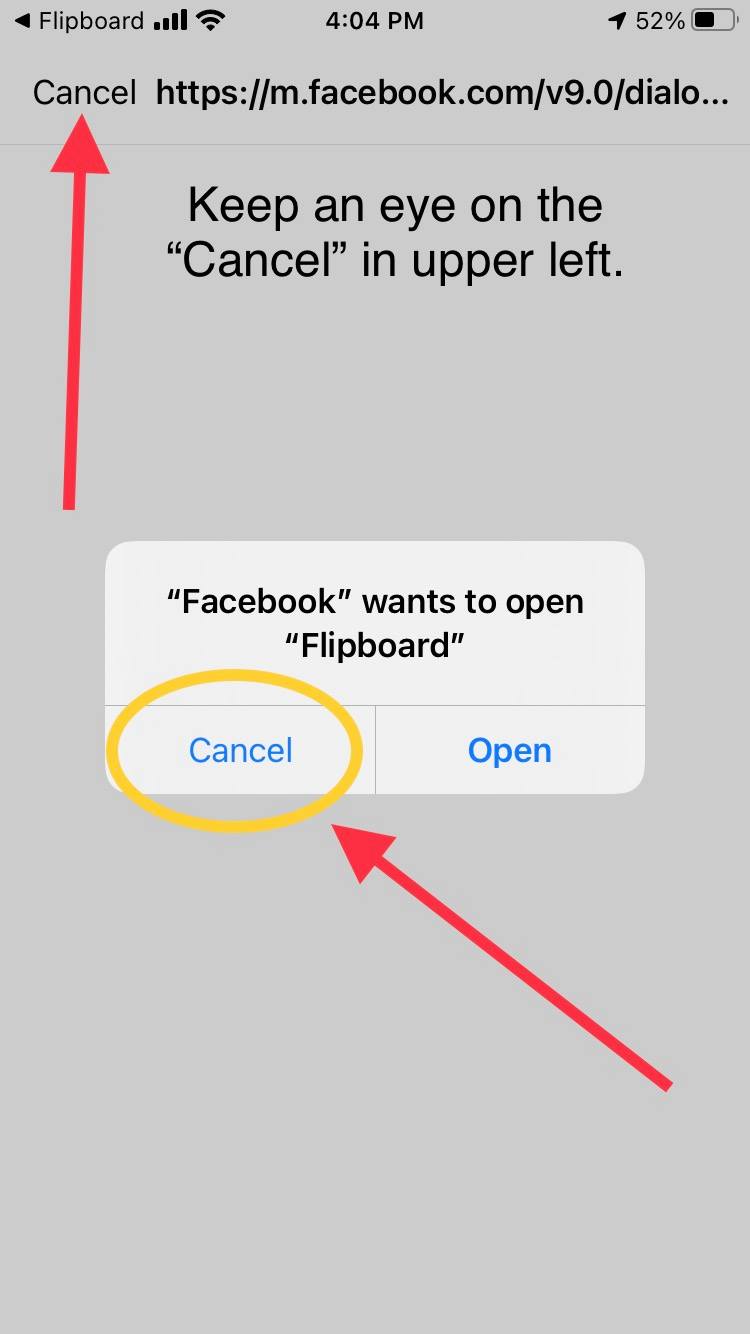
And then selects the "Cancel" option from this prompt:


The "Cancel" option in the upper left will disappear. This leaves the user...


Completely and totally stranded here. There doesn't appear to be any way to "Cancel" out of anything, and the user is forced to restart the Facebook app. This is a new problem, that I spotted with apps such as Flipboard and Etsy. I don't ever recall seeing this happen before.

Steps to Reproduce:

1. Have a Facebook account that has previously logged into Flipboard 
2. Download and launch the Flipboard app (version 4.2.111)
3.  Pick the three topics to follow and advance to the account login screen
4. Choose the "Continue with Facebook" prompt
5. From the "Flipboard wants to use Facebook" prompt select "Continue"
6. From the "Open in Facebook" prompt select "Open"
7. From the "You previously logged in" page select "Cancel"
8. From the "Facebook wants to open Flipboard" prompt select "Cancel"
9. Watch the "Cancel" in the upper left disappear 

Result: The user gets trapped on a page after canceling out of a Facebook authorization prompt - user is stuck with the Facebook app being unresponsive, cannot exit from a white screen

Expected: User should not be trapped 

Like I said: this seems to be happening with some apps - not all. 


They will now sometimes be stranded!

Monday, July 26, 2021

VRBO Vacation Rentals: iOS Share Sheet: Missing AirDrop icon

UPDATE:


I've checked this bug periodically over the years, and this finally looks fixed. 


iOS 14.7 on an iPhone 8

VRBO Vacation Rentals (version 2021.14)

Date: 07/26/21


Description:


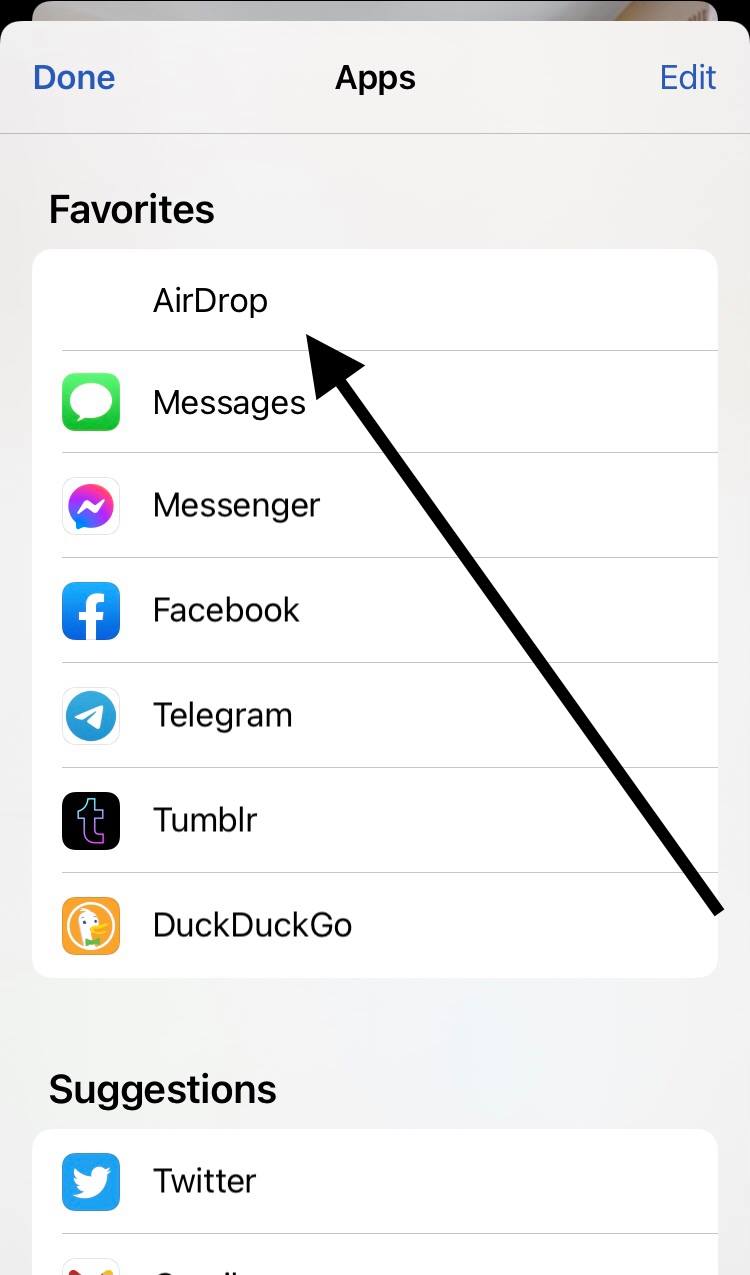
Here's an odd problem that I don't believe that I have ever seen before. An app called VRBO Vacation Rentals is not displaying the icon for AirDrop in the iOS share sheet.

Take a look at these screenshots:


As you can see, the icon for the AirDrop is missing.

Steps to Reproduce:

1. Launch the VRBO Vacation Rentals app
2. Head to the detail page of any listing 
3. Select the share option 
4. From the iOS Share Sheet, notice that the icon for AirDrop is missing

Result: The icon/image for AirDrop is missing from the Share Sheet when it is activated by the VRBO Vacation Rentals app

Expected: The icon/image for AirDrop should always display - the iOS share sheet should never display a blank or missing icon 


Choose the share option from any listing inside of the VRBO Vacation Rentals app.


The image for AirDrop is missing. 


Note that the icon for AirDrop is missing. 


Thursday, July 1, 2021

GETTR app for iOS: The Privacy Policy Link is not working in the App Store

 iOS 14.6 on an iPhone 8

Gettr app for iOS (version 1.0.1)

Date: 07/01/21


Description:

The new Gettr app for iOS is not in compliance with one of the most basic Apple App Store rules.


Apple's App Store Review Guidelines are pretty clear:


Under Section 5.1.1 Data Collection and Storage it states: "All apps must include a link to their privacy policy in the App Store Connect metadata field and within the app in an easily accessible manner."

In the App Store Connect metadata there is a privacy policy link...


However the page it leads to does not display a privacy policy - it looks to be a dead link:


Therefore, the new GETTR app is not in compliance with an app store regulation about accessibility to an app's Privacy Policy from inside of the app store. 

Steps to Reproduce:

1. Head to the Apple App Store
2. Go the GETTR detail page
3. Scroll down and click on the "privacy policy" link

Result: The "Privacy Policy" link for the GETTR app does not lead to GETTR's privacy policy - it leads to a page at getome.com/privacy that displays nothing 

Expected: The "Privacy Policy" link for the GETTR app in the Apple App Store should work and lead to a privacy policy 


Sunday, June 13, 2021

Minneapolis Star Tribune app for iOS: Continually Crashes

 iOS 14.6 on an iPhone 8

Minneapolis Star Tribune app for iOS (version 2.2.5)

Date: 06/13/2021


Description:


I spotted this tweet today on Twitter:


After reading this tweet, a was curious, so I decided to download the Star Tribune app for iOS myself. This user is absolutely correct - the app just continually crashes.

I took a video of what this looks like:


Here's the crash dump:


Steps to Reproduce:

1. Download the Star Tribune app for iOS
2. Scroll through the app and select a featured article 

Result: The Minneapolis Star Tribune app for iPhone is very unstable 

Expected: Should work, especially if users are paying for digital access 


Tuesday, June 8, 2021

CaratLane app for iOS: No ability to delete account

iOS 14.6 on an iPhone 8 

CaratLane app for iOS (version 7.2.0)

Date: 06/08/21

Description:

I just read today that Apple has updated their App Store Review Guidelines. The newly updated guidelines include the following provision regarding the ability of users to delete accounts:


I know it is hard to read, but under 5.1.1 Data Collection and Storage, it says that, "If your app supports account creation, you must also offer account deletion within the app."

Surprising to read about this change, in that huge numbers of apps don't offer this ability. If a user were to point this out in an app review, would this, say, necessitate a change in the app?

As soon as I read this, I checked it with a random app called CaratLane from India. And, sure enough, there's no ability to delete an account after creating one. 

Steps to Reproduce:

1. Download and launch the CaratLane app for iOS
2. Create an account (using email address)
3. Enter into app (signed into account)
4. Head to all areas of profile settings - including "log out" area - no option to "delete account"

Result: The CaratLane app for iOS has no option to "delete account" - the lack of a "delete account" option goes against the newly updated App Store Review Guidelines which state that, "If your app supports account creation, you must also offer account deletion within the app."

Expected: The CaratLane app for iOS must include an option to "delete account"


No option to "Delete Account" is accessible to the user...


No option to delete the account.