Friday, August 14, 2020

Domain Real Estate & Property app for iOS: Declining Facebook prompt still opens up Facebook sharing

iOS 13.6
Domain Real Estate & Property app for iOS (version 10.2.7)
Date: 08/14/20

Description:

There's an odd problem with Facebook sharing and the Domain Real Estate & Property app for iOS. This is a problem that I have occasionally seen with different apps, but I haven't been able to reproduce it on a consistent basis until I was able to do it with the Domain Real Estate & Property app.

Here's a screenshot of the issue:

The user will be presented with a prompt like this after trying to share a real estate listing. If the user selects the "Cancel" option to this prompt...

The Facebook sharing option still opens up! This shouldn't be happening, especially if the user declined this from the prompt.

With the Domain app this happens if:

The user shares something using the iOS share sheet while browsing the app in guest mode, or with any account created OTHER than Facebook login accounts.

Steps to Reproduce:

1. Download and launch the Domain Real Estate & Property app
2. (Don't create an account) - Select any real estate listing in the app
3. From any listing, select the share option
4. From the iOS share sheet menu, scroll over and select the "..." option
5. From the "Apps" option, scroll down and select "Facebook"
6. From the "Domain" wants to open "Facebook" prompt - select "Cancel"

Result: Selecting "Cancel" from an open Facebook prompt inside of the Domain Real Estate app does not work - selecting "Cancel" still opens a Facebook prompt

Expected: Selecting a "Cancel" option should NOT open up a Facebook sharing menu

Select any real estate listing...

Select the share option to activate the iOS Share Sheet...

Scroll over and select the "..." option...

Scroll down and select the "Facebook" option (notice that it is missing)...

Select the "Cancel" option...

The Facebook sharing option still appears!!!


Tuesday, August 11, 2020

The North Face app for iOS: App crashes if the user declines camera access from prompt

iOS 13.6
The North Face app for iOS (version 7.5.1)
Date: 08/11/20

Description:

Here's an example of a fairly common crash that happens with multiple iOS apps. This particular crash occurs with the current version of the The North Face app that is available to download from the Apple App Store.


Here's a video of the crash:
The app will crash if the user declines camera roll access. Here's the crash dump:


This is a common crash that will often see with iOS app. 

Steps to Reproduce:

1. Download and launch The North Face app for iOS
2.  Select "JOIN NOW"
3. From the "Become a VIPeak member"  screen, select the scanner option in the upper right
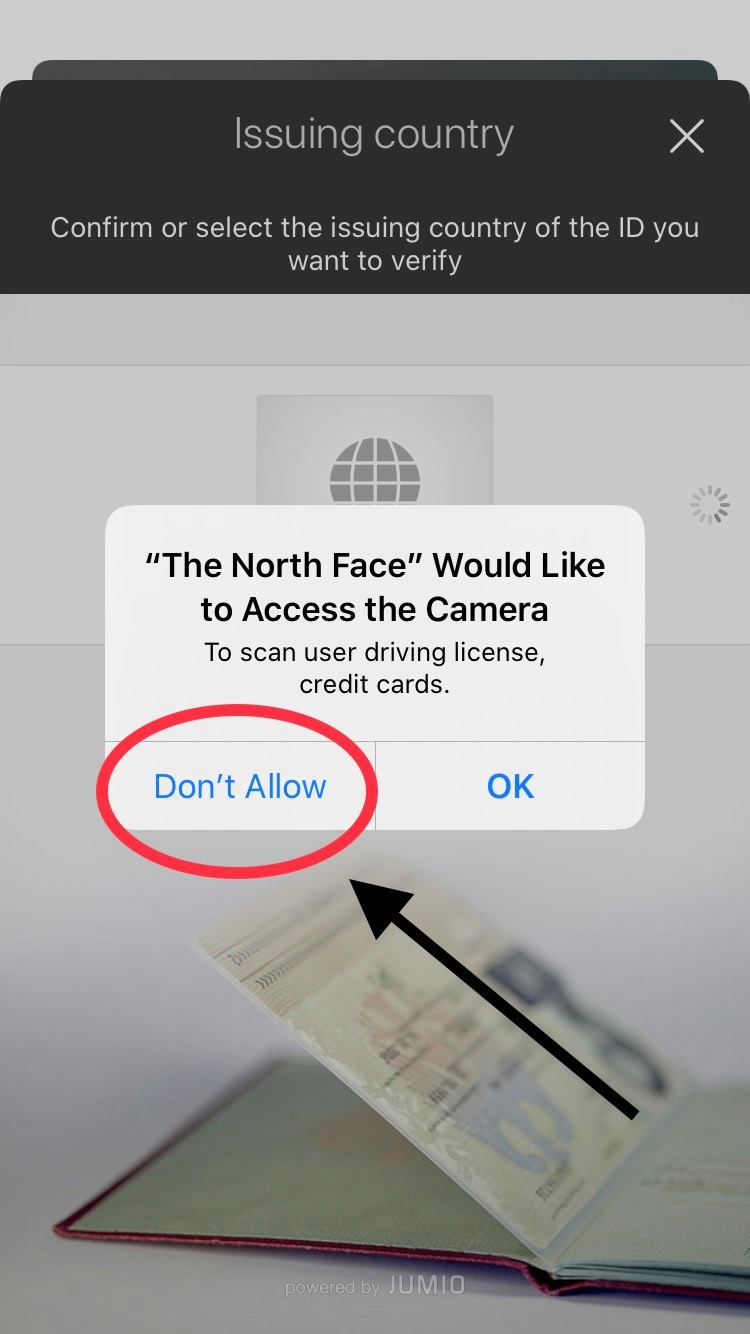
4. From the "Issuing Country" screen, select "Don't Allow"from the camera prompt pop-up

Result: Declining camera access to The North Face app for iOS results in the app crashing 

Expected: Declining camera access to The North Face app for iOS should not crash the app

Download and launch The North Face app for iOS...

Select the "JOIN NOW" option...

Select the scanner option in the upper right...

If the user selects the "Don't Allow" option, the app will crash. 

Monday, August 10, 2020

Indigo Beach app for iOS: Facebook Messenger UI menu options are not visible with the device set to the light mode

iOS 13.6 (device set to light mode)
Indigo Beach app for iOS (version 1.2)
Date: 08/11/20

Description:

Minor problem an app called Indigo Beach for iOS.

Take a look at the Facebook Messenger sharing UI with the device set to the dark mode:

Looks fine. The "Done" and "Send To" and "Send" area all visible.

Take a look at the Facebook Messenger sharing UI with the device set to the light mode:

Can't see the "Done" or the "Send To" or the "Send" options.

Steps to Reproduce:

1. Set the iOS device to the light mode
2. Launch the Indigo Beach app
3. Select any product and select share
4. From the iOS share sheet, select the FB Messenger option

Result: With the iOS device set to the light mode, the "Done" and "Send To" and "Send" options from the Facebook Messenger sharing UI are not visible

Expected: The "Done" and "Send To" and "Send" options from the Facebook Messenger sharing UI should always be visible


Thursday, August 6, 2020

Skoop! Inc.: Error Message of "JSON could not be serialized because of error" appears with all apps

iOS 13.6
The Annan Shed app for iOS
Menchie's app for iOS
Q Jump app for iOS
Project Pizza UK app for iOS
Farm Stores Mobile app for iOS
Best Budz Club app for iOS
5FiVE app for iOS
Welcome to Liverpool app for iOS
Wooster's Bakery app for iOS
POLN8 app for iOS

The majority of apps released by a company called Skoop! Inc. all display the following error message at launch.


This error message says:

"JSON could not be serialized because of error: The data couldn't be ready because it isn't in the correct format."


The following apps:

Best Club Terminal app for iOS
POLN8 Terminal app for iOS
Skoop! Terminal 2 app for iOS

Do not display this error message when they are launched.

Steps to Reproduce:

1. Download an launch any of the Skoop! apps specified above
2. Note the error message

Result: The majority of apps from a developer called Skoop! Inc. display an error message

Expected: An error message about JSON should not be displayed when an app is launched


Wednesday, August 5, 2020

Christie's app for iOS: Non-working "Privacy Notice" and "Terms & Conditions" links

iOS 13.6
Christie's app for iOS (version 7.1.6)
Date: 08/05/20

Description:

Minor problem with the Christie's app for iOS. When I open the app on my iPhone 8 running iOS 13.6, I cannot get either the "Privacy Notice" or "Terms & Conditions" links to work on the Sign Up portion of the app.


Steps to Reproduce:

1. Download and launch the app
2. Select the "My Account" option in the bottom right
3. From the "Sign Up" screen, scroll down to the section labeled "Christie's privacy statement"
4. Click on either the "Privacy Notice" or "Terms & Conditions" link

Result: Neither the "Privacy Notice" or "Terms & Conditions" links work for me under the "Christie's privacy statement area of the Sign Up portion of the app

Expected: That the "Privacy Notice" and "Terms & Conditions" links in the app should work - they should lead the iOS user to valid pages

After launching the app, select the "Sign Up" option...

Select either the "Privacy Notice" or "Terms & Conditions" links - I can't get either to work.

Monday, August 3, 2020

Pamono app for iOS: Selecting the Privacy Policy link crashes the app

iOS 13.6
Pamono app for iOS (version 1.2.20)
Date: 08/03/20

Description:

There is an easy to reproduce crash with the current version of the Pamono app for iPhone.

The app crash when the user clicks on the "Privacy Policy" link on the account creation page.

Take a look at the video:


Steps to Reproduce:

1. Download and launch the Pamono app for iOS
2. Select the Profile icon in the bottom right
3. From the "Account + Settings" screen, select "Sign Up"
4. From the "Let's Get Started!" screen, select the "Privacy Policy" link

Result: Selecting the Privacy Policy link on the "Let's Get Started" account creation screen crashes the Pamono app

Expected: The Pamono app shouldn't crash if the user selects the Privacy Policy link on the "Let's Get Started" account creation screen

Here is the crash dump:


Saturday, August 1, 2020

Facebook Login: New links lead to pages that have a non-working share option

iOS 13.6
Facebook Auth Login pages - Privacy Policy/TOS pages
Date: 08/01/20

Description:

Here's an odd thing that either just started, or I just started noticing. Facebook Authorization Login pages now seem have added links to the bottom.

Take a look at this screenshot:

This is the Log in for Pinterest. As you can see, two links have been added.

A great addition! Twitter authorization always had this.

There's an odd but that appears to happen after being taken to the pages linked to by this link. There's a share option which doesn't work.

Take a look at this screenshot:

Users are taken from the Facebook log in to pages like this. You'll notice the share option in the upper right...

The "Share Link" option does nothing. It should bring up the iOS share sheet, but it does not.

Steps to reproduce:

1. Using an app running iOS 13.6, launch an app that has a Facebook option for account creation 
2. Head to Facebook authorization 
3. Click on the next links at the bottom of the authorization page
4. Click on the "share" option in the upper right 
5. Click on "Share Link" option in the pop-up menu 

Result: There is a "Share Link" option accessible from the new links on the Facebook Messenger log in page - selecting "Share Link" does nothing, it should bring up the iOS share sheet

Expected: A "Share Link" option should work - should activate the iOS share sheet