Wednesday, July 27, 2022

MSCHF Sneakers - Inappropriate App Icon: Alternate app icon is George W. Bush shoe throwing incident in Iraq

 iOS 15.5

MSCHF Sneakers app for iOS (version 1.1.3)

Date: 07/27/2022

I was surprised when I saw this issue. There's an app called MSCHF Sneakers, which is currently in the top 100 free shopping apps in the Apple App Store. 

Like some apps, the MSCHF Sneakers app has an in-app option to change "toggle" between different app icons. The user can select this different app icon, reboot the device, and the new icon will appear. This is what the alternate icon is:


If you're too young to remember this, this is an image of President George W. Bush ducking a shoe that was thrown at him during a visit to Iraq in 2008

What's interesting about this, and what I sort of recalled after I first saw this, was that the use of this image in iOS apps has been controversial before. Way back in February of 2009, which was less than a year after the opening of Apple's App Store, there was a controversy about whether or not an app could be released that used images of this incident. 

A Pakistani game developer released a game called "MyShoe" which was quickly restricted from release due to the fact that ridiculed a public figure.

It was pointed out that the Apple's Terms of Service state that: "Applications must not contain any obscene, pornographic, offensive or defamatory content or materials of any kind (text, graphics, images, photographs, etc.), or other content or materials that in Apple's reasonable judgement may be found objectionable by iPhone or iPod touch users."

I would say that if this (images of the shoe throwing incident) were grounds for removing an app in 2009, then the same reasoning should apply in 2022. Trying to understand the murky reasoning behind the App Store and their guidelines is difficult - not sure how complete their review teams are if something like this can make it's way to the public.

I am going to write an email about this directly to Apple's legal department, post it on their developer console feedback form, and, of course, gleefully point this out on Twitter. 

Steps to Reproduce:

1. Download the MSCHF Sneakers app for iOS
2. (Creating an account is not necessary) - scroll up through the displayed sneakers 
3. From the "BACK TO TOP" screen choose the "GET UNSHOE'D!" option 
4. From the "You have changed the icon for "Sneakers" option, select "OK"
5. Reboot the phone (I had to reboot once to get this to start working)

Result: Selecting the alternate App Icon for the MSCHF Sneakers app results in an App Icon of George W. Bush ducking from a shoe 

Expected: Since representations of this image were clearly prohibited in apps in 2009, the same image should NOT be allowed as an app icon in app released in 2022 

Apple App Store review process should NOT have allowed this app to be released as is.

See the attached screenshots:

Download and launch the MSCHF Sneakers app for iOS. 

Creating an account is not necessary. Scroll down through the shoes...

Select the "GET UNSHOE'D!" option...

The alternate app icon is now an image of George W. Bush ducking a shoe. NOTE: I had to re-boot the phone once to get the switch to take effect. (this is a common iOS bug)

An image of George W. Bush ducking from a thrown shoe is now used as an app icon. The use of this image in apps was a controversial subject way back in 2009. 


Saturday, June 4, 2022

Nuuly Rent app for iOS: No way to back out of the Privacy Policy or Terms & Conditions screens accessed from Link Your Mobile Phone

 iOS 15.5

Nuuly Rent app for iOS (version 1.5.0)

Date: 06/04/2022

Description:

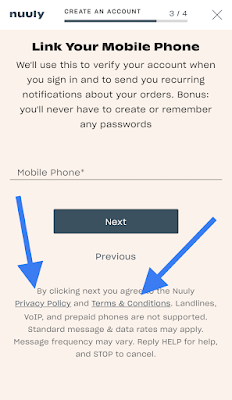
There does not seem to be a way to back out of either the "Privacy Policy" or the "Terms & Conditions" screens when they are accessed of from the "Link Your Mobile Phone" screen. 

As near as I can tell, the user is simply stranded on these screens when accessed from this screen:

Nuuly Rent mobile phone confirmation screen

After selecting "Privacy Policy" the user is left hanging on this screen:

Nuuly Rent Privacy Policy screen - Can't Back Out


Steps to Reproduce:

1. Launch the Nuuly Rent app for iOS

2. Select "Join Now"

3. Select "Next"

4. Enter in a First Name

5. Enter in an email

6. From the "Link your Mobile Phone" screen, select either "Privacy Policy" or "Terms & Conditions"

Result: There does not seem to be a way to back out of either the "Privacy Policy" or "Terms & Conditions" screen when they are accessed from the "Link your Mobile Phone" screen's links 

Expected: Nuuly Rent users should not be left stranded on either Privacy Policy or Terms & Conditions screens


Tuesday, May 10, 2022

Farmish app for iOS: Typo on the Password Reset option

 iOS 15.4.1

Farmish app for iOS 

Date: 05/10/2022

Description:

There's a minor typo on the password reset user interface:

Password is misspelled. 


Steps to Reproduce:

1. Launch the Farmish app

2. Select the "Forgot password?" option 

3. Note that password is misspelled

Result: Minor typo on the password reset user interface - the word "password is misspelled 

Expected: No typo 


Wednesday, May 4, 2022

Zenly app for iOS: Dismissing social media invites shows invite was successfully shared

 iOS: 15.4.1

Zenly app for iOS (version 5.0.3)

Date: 05/04/2022


There's an odd bug with the social media sharing options that are accessible after adding a friend by phone number. 

This is easier to show than to describe, so please take a look at the screenshots below.

After entering in a phone number on the "add by phone number" page, the user is presented with this screen:


The user can then activate any one of these options, such as Messenger:

If the user exits out of this prompt (without sending any link).....


This message appears. This is misleading as the user DID NOT send out a request. 

I've read before about how this was sometimes an issue with Facebook Messenger. This also happens with Telegram. 


Steps to Reproduce:

1. Create an account 

2. Select the gearbox settings option 

3. Select "account"

4. From the account screen, select "friends"

5. From the "manage your friends" screen select "add friends"

6. From the "add friends" screen select "by phone number"

7. Enter in a phone number 

8. Cancel out of the text

9. Select any social media option on the "choose an app to send your invite" screen

10. Open and close any option WITHOUT sending the link

Result: A success message appears after the user closes out app options to share a link

Expected: A success message should never appear if the user cancels out of sending a message 


Havenly app for iOS: The AirDrop icon is not displaying in the iOS Share Sheet

 iOS 15.4.1

Havenly app for iOS (version 6.0.14)

Date: 05/04/22

The AirDrop icon is missing from the iOS Share Sheet when it is accessed from the Havenly app.


Take a look:


As you can see, the AirDrop icon is missing.


Steps to Reproduce:

1. Launch the Havenly app and create an account

2. Head to any product in the app that can be shared 

3. Activate the iOS share sheet

4. Look for the missing AirDrop icon 

Result: Missing AirDrop icon with the share sheet when accessed via the Havenly app

Expected: AirDrop icon should always appear 


This is a problem that I have seen on two other occasions

Saturday, April 30, 2022

Zenly app for iOS: The Ghost Mode Instructions Are Nearly Inaccessible for New Users Who Limit Contacts or Who Don't Have Friends - Is This By Design?

 iOS 15.3

Zenly app for iOS (version 5.0.2)

Date: 04/30/2022

Description: 

Today I downloaded the Zenly app for iOS. I created an account using a phone number, but I purposefully did NOT give the app access to the contacts on my phone. 

I wanted to browse through the app while giving the app as limited amount of access to my personal information as possible. 

After creating an account, I see the familiar gear-box option for settings:

After creating an account, a setting options is available in the upper right.

This settings option takes me to a settings page where information about a "ghost mode" option is on screen:


I am just trying out the app, and I am weary about what type of information I am sharing. I want to read about this "ghost mode" which seems like a privacy feature I might be interested in...


This text appears on screen for perhaps 1 second. Before I can even focus on what any of it says...


This message appears. Why would I want to add friends before I understand all of the privacy features of the app? Why did text flash and disappear before my eyes in a split-second? 

Steps to Reproduce:

1. Create a new Zenly account - do not give app access to Contacts/do not add any friends
2. Select the Settings option in upper right
3. Scroll down and select "Ghost Mode" 
4. Text about "Ghost Mode" flashes quickly and disappears 

Result: The "Ghost Mode" instructional text appears and disappears in a brief moment 

Expected: A portion of the UI related to privacy features should always be accessible - text appearing and then disappearing is not an optimal end user experience 


Monday, February 28, 2022

VK app for iOS: Sign in With Apple is not operating

 iOS 15.2

VK VKontakte app for iOS (version 7.13)

Date: 02/28/2022

Description: 

Sanctions against Russia kicked in today, following their Nazi-esque invasion of Ukraine last week. Today I noticed something odd with the VK app. The "Sign In with Apple" option is not working. The same thing has reproduced on multiple devices. 

I don't think that this is related to sanctions, but it was odd to discover this on the day that sanctions were implemented.

Steps to Reproduce:

1. Download and launch the VK app for iOS

2. Launch the app

3. Click on the Apple icon 

4. Click on "Log In"

5. Click on "Sign in with Apple"

Result: The "Sign in with Apple" option is not work with the VK app for iOS - unknown if this is related to the sanctions that took effect this morning

Expected: That the "Sign in with Apple" option should work inside of the VK app for iOS


Download and launch the VK app...

Selecting the "Sign in with Apple" option does nothing...

The "Sign in with Apple" option inside of the VK app for iOS is not working today.